
BTEUP Exam Registration (Exam Form) 2026: Full Process — Check Your Form, Pay the Fee & Get It Forwarded, Step by Step
Your ESeva login alone does not put you in the exam hall. For every semester exam, one more job must be completed — your exam registration, that is, your examination form. Think of it as your name being entered in the exam list: the board prepares admit cards only for the students on that list. The good news is that the process is short, and you do most of it yourself from your own student login. The board has opened the window for this odd semester (1st, 3rd, 5th sem) right now — 24 to 31 October 2026 — so read this guide and finish your form today itself.
First, Understand Who Does What
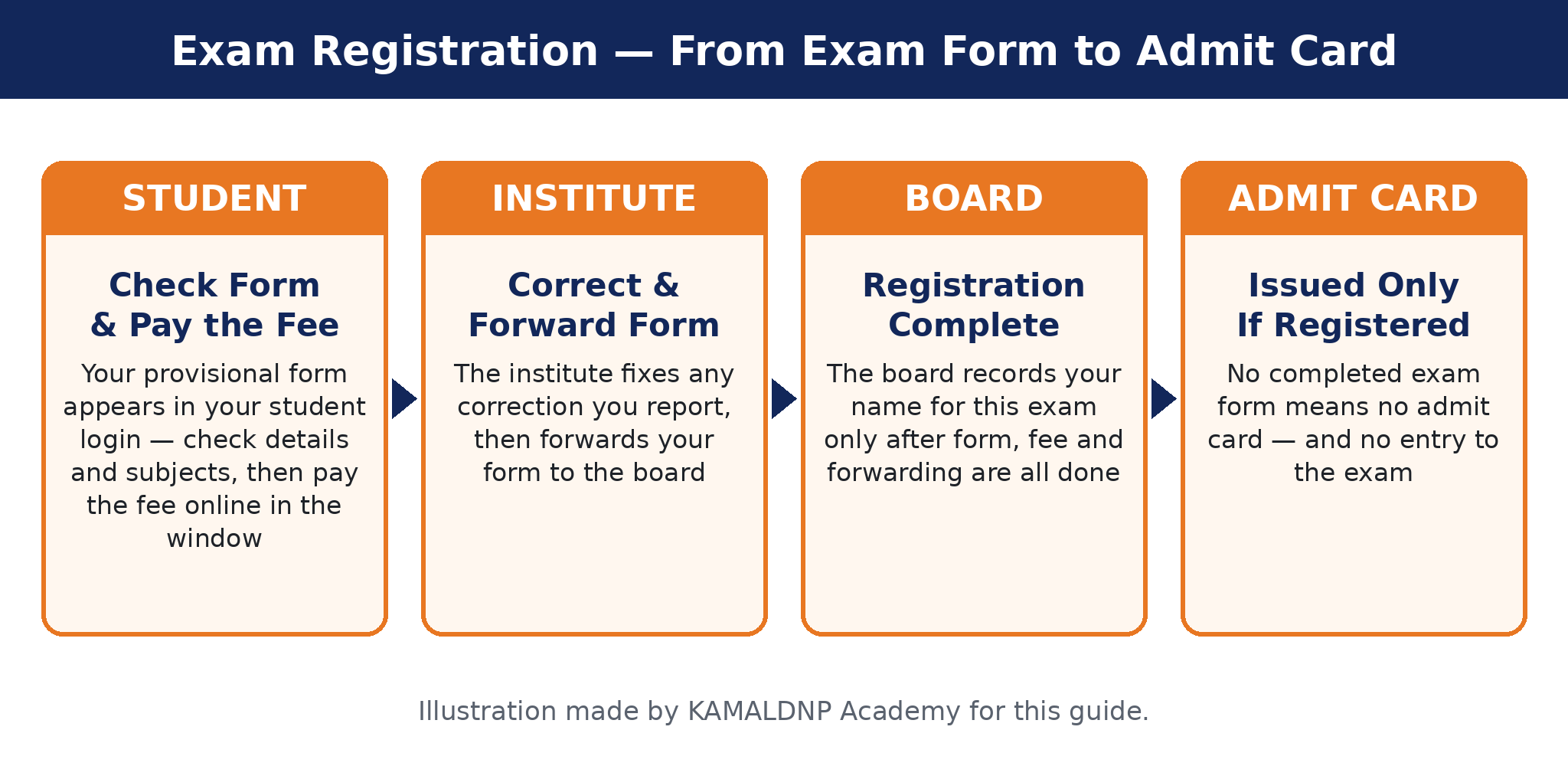
Exam registration is a team job of three — the board, you, and your institute. If you know your part, nothing gets missed:
- The board (BTEUP) opens the exam-form window, fixes the fee, and makes your provisional form in its system.
- You, the student, open the form in your student login, check every detail and subject, report any mistake, and pay the exam fee online in time. The board's notices say this clearly: completing the form and paying the fee on time is the student's own responsibility.
- Your institute corrects any wrong detail you report, and then forwards your form to the board through the institute login. This forwarding is the last step — a form that is not forwarded is not a completed registration.
Earlier, our ESeva registration and login guide explained how your login is created. This guide is the next step — what you must do with that login every semester.
This Semester's Window — Odd Semester 2026-27
As per the board's notice for the November–December 2026 exams:
- Exam form and fee: 24 October to 31 October 2026 (up to midnight).
- Institute forwarding of forms: 24 October to 2 November 2026.
The form is filled inside the same official login — the ESeva Student Login on bteup.ac.in. If you are reading this after these dates, do not wait and hope: go straight to your institute and ask. In one past cycle the board did open the window again for a few days for students who were left out, but that is the board's choice, never a promise.
Keep These Things Ready
- Your enrolment number and login — the same ESeva login you use for the admit card. If you cannot log in yet, first follow our ESeva login guide.
- Your last marksheet — you need it to be sure of your back subjects, if you have any.
- A phone or computer with internet, and a way to pay online — UPI, debit card or net banking, with the fee amount ready.
- Your college ID card or admission slip — carry it when you visit the institute for a correction.
- A notebook or your phone notes — to write down the payment transaction number and keep the fee receipt safe.
Exam Registration — Step by Step
Step 1. When the window opens, log in to the ESeva Student Login from the button above.
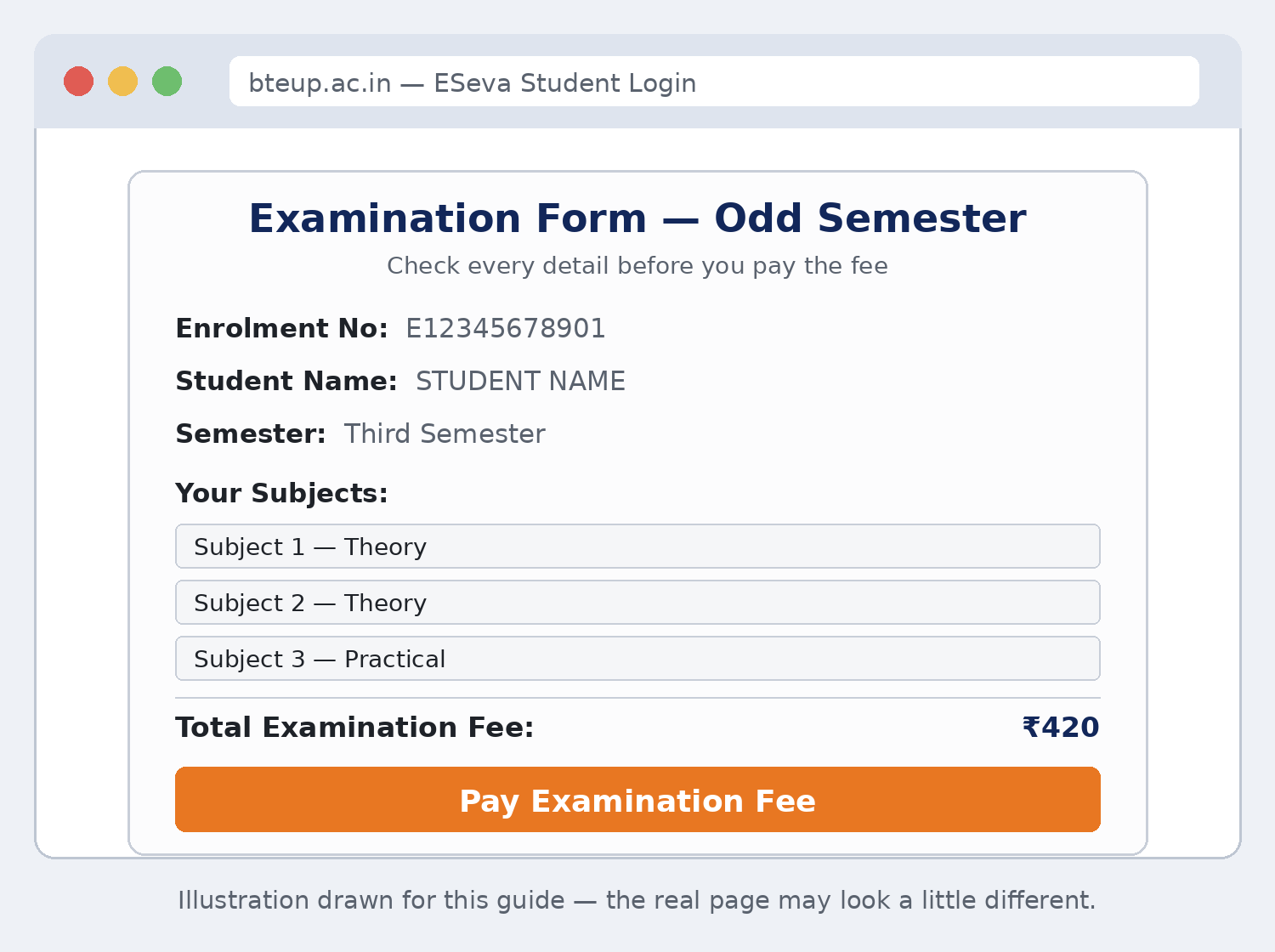
Step 2. Open your examination form. It comes mostly ready — the board's system fills it from your enrolment record. You will see your name, your father's name, your mother's name, your date of birth, your semester and branch, the full list of your subjects, and the total fee. This ready form is called the provisional form.
Step 3. Check every line slowly — this checking is the most important part of the whole process. The next section gives you a full checklist.
Step 4. If anything is wrong, do not pay yet. Go to your Principal's office or exam cell and report the mistake. The board's rule is simple: corrections are made through the institute. Get the form corrected first.
Step 5. When the form is fully correct, pay the fee through the 'Pay Examination Fee' link in your login, inside the same window. In the recent cycles the payment opened through SBI Collect — the payment page must show the name "Board of Technical Education, UP". Pay only under that name. The board has warned students never to pay by choosing their institute's name there.
Step 6. After payment, save the receipt — download it, screenshot it, and note the transaction number. This receipt is your only proof if anything is questioned later.
Step 7. Now confirm the last step with your institute: ask the exam cell, "Has my form been forwarded to the board?" Institutes forward forms up to the forwarding last date (2 November 2026 this semester). Your registration is complete only after this forwarding.
Step 8. Done. When the board releases the admit cards, yours will come in this same login — our admit card guide shows the download steps.
The Fee — How Much, As Per the Board's Notices
- Regular semester (1st, 3rd, 5th sem): ₹420 per student. This one amount covers the exam fee, the application fee and the marksheet fee. It is the same ₹420 the board charged in the last cycles, including the December 2024 exam.
- Back paper: ₹100 for one subject, ₹200 for two or more subjects — as per this semester's notice. In the previous cycle the board charged ₹100 extra for every subject beyond two, so always go by the total shown on your own form.
- Special back paper: ₹370 per student — a flat amount, the same in the recent notices.
- Diploma in Pharmacy (annual system, 1st year): ₹570 — as per the most recent (May 2026) cycle notice.
One rule above all: your own form shows your exact total before you pay. Pay exactly that amount — not a rupee more to anyone, in any other way. If the amount on your form looks wrong, ask your institute before paying, not after.
How to Verify Your Form Before It Is Final
Tick these points one by one while your provisional form is open:
- Your name's spelling is exactly as on your high-school certificate.
- Your father's name and mother's name are correct.
- Your date of birth is correct.
- Your branch and semester are the ones you are studying in now.
- Every subject of this semester is listed — theory and practical, nothing missing, nothing extra.
- If you have back subjects, they are included in the form.
- The fee total matches the notice amounts given above.
- After paying, your receipt is saved and the payment shows as done.
- After the forwarding days, you have confirmed the forwarding with your institute. When the institute shares its registered-students list, find your name on it.
Back Paper & Special Back Paper Registration
Back paper: if you failed a subject in an earlier semester — you "have a back" in it — you sit that subject again with the matching semester's exam. Backs of odd-semester subjects are written with the odd-semester exam, so this window is your chance. Your back subjects are part of this same exam form, and the back-paper fee above applies. Check your last marksheet, make sure every back subject is in your form, and tell the institute at once if one is missing.
Special back paper: the board also holds a special back paper exam — an extra chance for students carrying backs, including many who have finished their final semester. In the recent cycles it has been held together with the semester exams (the December exams' forms even carry both names together: "Odd Semester / Special Back Paper"). The fee is a flat ₹370 per student. Which sitting you belong to — regular back or special back — is decided by the board's notice and your record; your institute will confirm it. Do not fill the wrong one on a guess.
One honest note: these exam-form notices cover back papers for subjects you failed. There is no separate "improvement" form for a subject you have already passed. If you are hoping to improve a passed subject's marks, ask your institute what facility, if any, applies to you — do not assume one exists.
Mistakes & Corrections — What to Do
Wrong name, wrong subject, wrong date of birth? There is one route, and it is a good one: your Principal / institute exam cell. The board's notices say the student contacts the Principal and gets the correction made. Do it before your form is forwarded — after that, changing anything becomes very hard, and a form once finally submitted cannot simply be deleted, as the board stated in the December 2024 cycle.
Paid the fee on a wrong form? Go to the institute the same day, receipt in hand. Do not pay a second time on your own guess — the institute will tell you the correct way.
Form filled but not forwarded? That is the institute's step, and the forwarding window is short (this semester, till 2 November 2026). If your institute is delaying, meet the exam cell in person with your fee receipt before the last date — politely, but in person.
What Happens If You Skip It
Be very clear about this: the portal closes at midnight on the last date, and after that no form and no fee is accepted. A student whose registration is not complete gets no admit card — and without an admit card there is no entry to the exam. That means losing the whole semester. Your login, your preparation, your attendance — none of it can replace this one form. Finish it in the first days of the window, not the last evening.
Stay Safe — 5 Money Rules
1. Pay only from inside your own login on bteup.ac.in, and check that the payment page names the Board of Technical Education, UP. 2. Never hand cash to any person, agent or shop "for the exam fee" — the board takes this fee online only. 3. Keep your fee receipt and transaction number safe until your result is out. 4. Never share your login password or any OTP with anyone — nobody needs them to "help" you. 5. Your institute's help with corrections and forwarding is free — it is their duty. If anyone demands money for it, report it to the Principal.
Frequently Asked Questions
Who fills my exam form — me or my college?
Both have a part. The form appears in YOUR student login; you check it and pay the fee. Your institute corrects any mistake you report and forwards the form to the board. Your registration is complete only when all three parts are done.
What are the dates for this semester (odd semester 2026-27)?
As per the board's notice: exam form and fee from 24 October to 31 October 2026 (midnight), and institutes forward the forms up to 2 November 2026. If you are reading this later, check bteup.ac.in and your institute for any fresh notice.
How much is the exam fee?
₹420 for a regular semester student (exam fee + application fee + marksheet fee). Back paper: ₹100 for one subject and ₹200 for two or more subjects. Special back paper: ₹370 per student. Your own form shows your exact total — pay exactly that.
I paid the fee, but my institute has not forwarded my form. What now?
Meet your exam cell in person with your fee receipt, before the forwarding last date. The forwarding is the institute's step, and without it your registration is not complete — do not just wait and assume it will happen.
A subject is missing from my form — or a wrong subject is showing. What should I do?
Do not pay on that form. Report it to your Principal or exam cell at once and get the subject list corrected first; corrections are made through the institute, and they must happen before your form is forwarded.
I missed the last date. Is there still a chance?
The portal closes on the last date and the board does not promise another chance. In one past cycle it did reopen the window for a few days in students' interest. Go to your institute immediately and ask — that is the only useful step left, and every day of delay makes it weaker.
Related Posts
- BTEUP ESeva Student Registration & Login: How to Register, Login, Download Admit Card & Check Result — Step by Step
- BTEUP Odd Semester Exam 2026-27 (1st, 3rd, 5th Sem): Expected Dates, Admit Card, Date Sheet, Exam Pattern
- BTEUP Admit Card 2026: How to Download the Odd Semester Hall Ticket (1st, 3rd, 5th Sem)
- BTEUP Exam Preparation 2026-27 (Odd Semester): Admit Card, Date Sheet, Previous Papers, Notes & Practice Papers
- BTEUP Odd Semester Result 2026-27 (1st, 3rd, 5th Sem): Expected Date, How to Check, Marksheet & Rechecking
- How to Check BTEUP Result Online & Download the Marksheet: Step-by-Step Guide with Scrutiny & Re-evaluation


Comments (0)
Share your question or experience about this syllabus. Your comment will appear after review.
No comments yet — be the first to share your thoughts!