HTML की बुनियादी बनावट: doctype, head, body
3 मिनट पढ़ें · मुफ़्त · बिना लॉगिन
हर HTML पेज एक ही बुनियादी बनावट पर चलता है। एक बार इसे सीख लेने के बाद, आप किसी भी वेब पेज का code पढ़कर समझ सकते हैं कि कौन सी चीज़ कहाँ है।
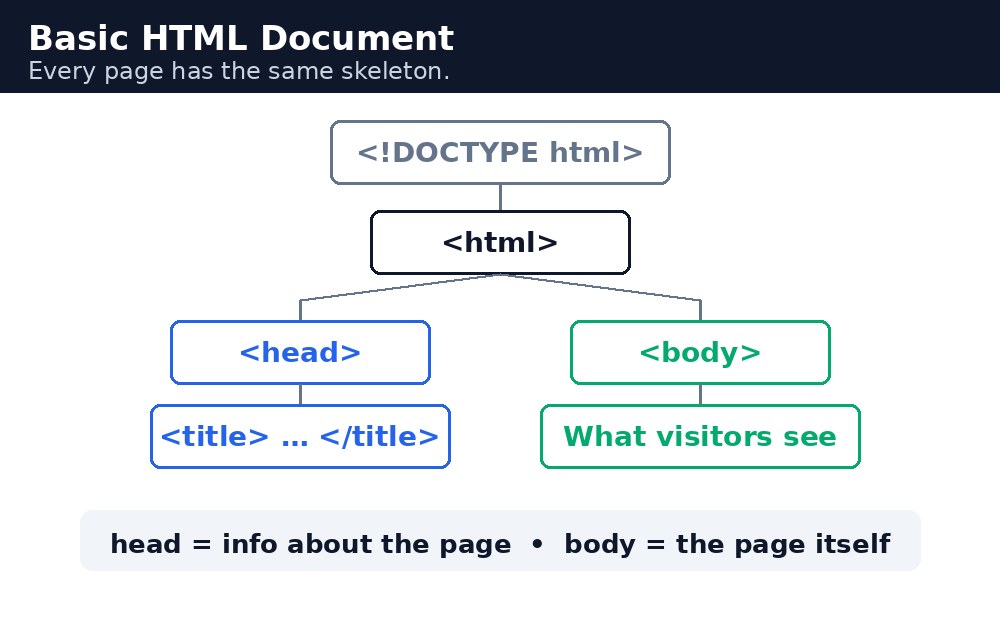
पेज के पाँच हिस्से
<!DOCTYPE html>— पहली लाइन। यह browser को बताती है: यह एक HTML5 document है। यह कोई tag नहीं है; यह एक declaration है।<html>— root element। पेज की हर चीज़ इसके अंदर होती है।<head>— पेज के बारे में जानकारी: title, character set, CSS के link। Head के अंदर कुछ भी पेज पर दिखता नहीं है।<title>— वह text जो browser tab पर दिखता है। यह head के अंदर होता है।<body>— वह सब कुछ जो visitor सच में देखता है: headings, text, images, links, buttons।
Tags कैसे काम करते हैं
ज़्यादातर tags जोड़ों में आते हैं: एक opening tag जैसे <h1> और एक closing tag जैसे </h1>। Content उनके बीच में होता है। कुछ tags, जैसे <br> और <img>, का कोई closing tag नहीं होता — उन्हें empty elements कहा जाता है।
पाँच हिस्से, सरल भाषा में
पेज को एक पत्र की तरह समझें। <!DOCTYPE html> लिफाफे पर लगा टिकट है — यह बताता है कि यह किस तरह का document है। <html> खुद लिफाफा है, जिसमें सब कुछ है। <head> लिफाफे पर लिखा पता है — पत्र के बारे में जानकारी, पत्र खुद नहीं। <title> subject line है। और <body> असली पत्र है — वह हिस्सा जिसे लोग पढ़ते हैं।
याद रखने की तरकीब: DOCTYPE = टिकट, html = लिफाफा, head = पता, title = विषय, body = पत्र।
Syntax — पूरा पेज
<!DOCTYPE html>
<html lang="en">
<head>
  <title>Page title</title>
</head>
<body>
  <h1>Heading</h1>
  <p>Paragraph.</p>
</body>
</html>
lang="en" वाला हिस्सा browser को बताता है कि पेज English में है। इससे screen readers शब्दों को सही उच्चारण से पढ़ते हैं, और search engines को पेज समझने में मदद मिलती है।
<head> अदृश्य होता है। उसके अंदर कुछ भी पेज पर नहीं दिखता। शुरुआती लोग अक्सर गलती से दिखने वाला text head में डाल देते हैं — अगर आपका text नहीं दिख रहा है, तो जाँचें कि वह <body> के अंदर है।<body> के अंदर के tags को दो spaces से indent करें। इसमें कुछ खर्च नहीं होता और जब पेज बड़ा होता है तो आपका code पढ़ना बहुत आसान हो जाता है।आम गलतियाँ
<!DOCTYPE html>सबसे ऊपर लिखना भूल जाना — तब browser अंदाज़ा लगाता है, और पेज अलग दिख सकता है।- Headings या paragraphs को
<body>के बजाय<head>के अंदर डालना। - एक पेज पर दो
<h1>headings इस्तेमाल करना — मुख्य heading के लिए सिर्फ एक ही इस्तेमाल करें। langattribute छोड़ देना — इसे जोड़ने में कुछ सेकंड लगते हैं और यह सबकी मदद करता है।
उदाहरण
<!DOCTYPE html>
<html>
<head>
<title>Page Title</title>
</head>
<body>

<h1>My First Heading</h1>
<p>My first paragraph.</p>

</body>
</html>
परिणाम

खुद करके देखें — लाइव एडिटर
नीचे दिया गया कोड बदलें और चलाएँ दबाएँ — परिणाम तुरंत दिखेगा। कोई फाइल सहेजनी नहीं है, कोई लॉगिन नहीं चाहिए।
संबंधित पाठ
अक्सर पूछे जाने वाले सवाल
इस पाठ के बारे में सबसे ज़्यादा पूछे जाने वाले सवाल — सवाल पढ़ें, फिर खोलकर जवाब देखें।
1. HTML पेज के पाँच हिस्से कौन से हैं?
DOCTYPE html, html रूट एलिमेंट, head, title और body। Title ब्राउज़र टैब पर दिखता है और body में वह सब होता है जो देखने वाला देखता है।
2. Head में क्या लिखा जाता है?
पेज के बारे में जानकारी, जैसे title, कैरेक्टर सेट और CSS के लिंक। Head के अंदर कुछ भी पेज पर दिखाई नहीं देता।
3. मेरा लिखा टेक्स्ट पेज पर क्यों नहीं दिख रहा?
हो सकता है आपने उसे गलती से head में लिख दिया हो। दिखने वाला टेक्स्ट हमेशा body के अंदर होना चाहिए।
Check yourself — did you get it?
Finished the lesson? Test yourself with 5 quick questions — you get the answer instantly, with the reason for each one.
1. What is the root element of every HTML page?
2. What appears on the browser tab?
3. Which of these is NOT a tag but a declaration?
4. Where does the visible content of a page go?
5. What does lang="en" tell the browser?
Interview questions — can you answer these?
Read the question first, try to answer it in your own words, then open it to check. These are the questions interviewers actually ask.
1. What is the basic structure of an HTML page?
<!DOCTYPE html> first, then <html> as the root element, <head> for information about the page (title, character set), and <body> for everything the visitor sees.
2. What is the difference between <head> and <body>?
<head> holds information about the page — the title, the character set, links to CSS. Nothing inside <head> is shown on the page. <body> holds everything the visitor actually sees.
3. What does <!DOCTYPE html> do?
It tells the browser that this is an HTML5 document. It is a declaration, not a tag, and it must be the very first line. Without it, the browser guesses, and the page may look different.
Try it yourself — build this
Reading is not enough — now build it yourself. Write the code in the live editor, run it, check the hint if you get stuck, and open the solution only after you have tried.
1. Build the five parts
Create a page with all five parts: <!DOCTYPE html>, <html>, <head>, <title> and <body>. The title must be "My Daily Routine" and the body must have one <h1> and two <p> elements.
Show solution
<!DOCTYPE html>
<html lang="en">
<head>
<title>My Daily Routine</title>
</head>
<body>
<h1>My Daily Routine</h1>
<p>I wake up at 6 AM and study HTML for one hour.</p>
<p>In the evening I practise what I learned and build a small page.</p>
</body>
</html>
खुद क्यों सीखें — AI से पूछने के बजाय?
AI आपके लिए कोड लिख सकता है, लेकिन वह आपके लिए सोच नहीं सकता। जब आप HTML खुद सीखते हैं, तो आपका दिमाग असली कौशल बनाता है: आप समझते हैं कि पेज ऐसा क्यों दिखता है, टूटने पर उसे ठीक कर सकते हैं, और परीक्षा या इंटरव्यू में बिना मदद के जवाब दे सकते हैं। यही कौशल नौकरी दिलाता है — कॉपी किया हुआ जवाब नहीं।
सर्टिफिकेट पाएँ — सिर्फ ₹10
सभी 35 पाठ पूरे करें, टेस्ट पास करें (80%), ₹10 दें और अपना सर्टिफिकेट पाएँ।
टेस्ट देंदेखकर सीखना पसंद है? वीडियो कोर्स में वही विषय एक-एक करके सिखाए जाते हैं।
Go further with a full course
Free tutorials teach you the basics. Our paid courses add live projects, mentorship and a certificate.
Browse all courses