HTML Attributes: href, src, alt, title की पूरी सूची
4 मिनट पढ़ें · मुफ़्त · बिना लॉगिन
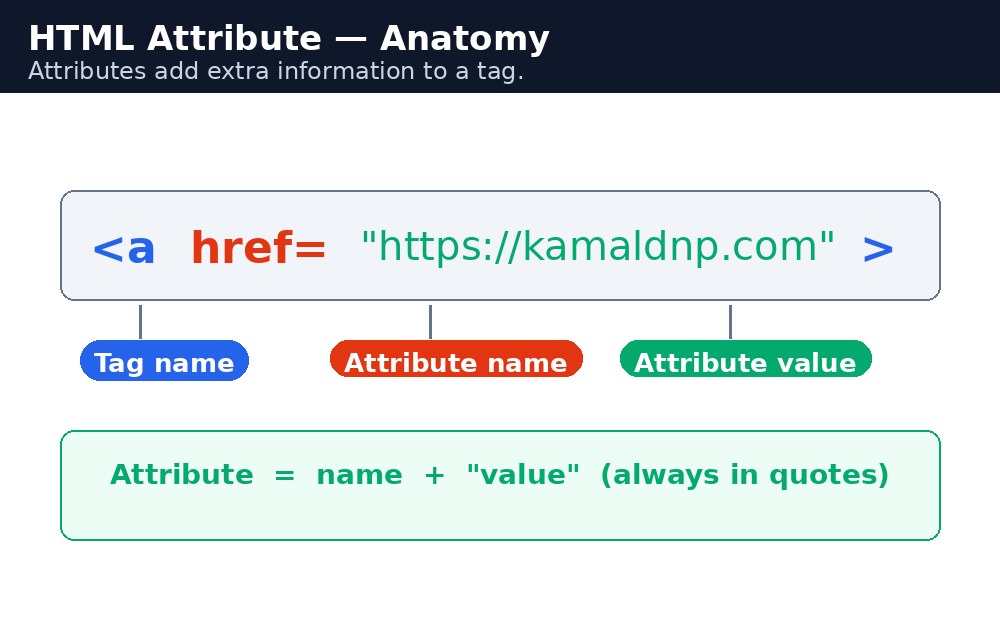
Attributes किसी element के बारे में अतिरिक्त जानकारी देते हैं। वे हमेशा start tag के अंदर, name="value" के रूप में होते हैं। Value आमतौर पर double quotes के अंदर लिखी जाती है।
आम attributes
href— वह पता जिस पर link जाता है:<a href="https://kamaldnp.com">Visit us</a>src— वह file जिसे image या script load करता है:<img src="photo.jpg">alt— वह text जो तब दिखता है जब image load नहीं हो पाती, और जिसे screen readers पढ़ते हैं।widthऔरheight— pixels में image का आकार।title— एक छोटा tooltip जो तब दिखता है जब mouse element पर रुकता है।style— element पर सीधे लिखा गया CSS।
Quotes मायने रखते हैं
Attribute values को हमेशा quotes में रखें। Double quotes standard हैं। Single quotes भी काम करते हैं, लेकिन उन्हें मिलाना या छोड़ देना bugs पैदा करता है — खासकर जब value में खुद spaces हों। उदाहरण के लिए, बिना quotes के href=https://kamaldnp.com काम कर सकता है, लेकिन बिना quotes के title=My Photo टूट जाता है, क्योंकि browser सिर्फ My को value समझता है।
हर element के attributes होते हैं
लगभग हर HTML element global attributes स्वीकार करता है — id, class, style और title। जब आप CSS से पेजों को style करना शुरू करेंगे तो आप id और class का लगातार इस्तेमाल करेंगे, इसलिए उन्हें अभी से याद रखें।
href, न कि HREF।Attribute क्या होता है
Attribute वह अतिरिक्त जानकारी है जो आप किसी tag में जोड़ते हैं। यह हमेशा start tag के अंदर, tag के नाम के बाद होता है, और इसका हमेशा एक नाम और एक value होती है: name="value"। Attributes बदलते हैं कि element कैसे व्यवहार करता है या कैसा दिखता है — link को यह जानने के लिए href चाहिए कि कहाँ जाना है, और image को यह जानने के लिए src चाहिए कि कौन सी तस्वीर दिखानी है।
याद रखने की तरकीब: Attribute = नाम + मान — हमेशा start tag के अंदर, हमेशा quotes में।
आम attributes
| Attribute | Value | विवरण |
|---|---|---|
href | एक वेब पता | Link कहाँ जाता है। |
src | एक file path | कौन सी image, video या script load करनी है। |
alt | text | वह text जो तब दिखता है जब image load नहीं हो पाती, और जिसे screen readers पढ़ते हैं। |
class | एक या ज़्यादा नाम | Elements को समूह में रखता है ताकि CSS उन्हें एक साथ style कर सके। |
id | एक नाम | पेज पर एक ही element को एक अनोखा नाम देता है। |
style | CSS नियम | एक element को सीधे style करता है। |
title | text | अतिरिक्त जानकारी, hover करने पर छोटे tooltip के रूप में दिखती है। |
यहाँ वही link दो तरीकों से लिखा गया है। पहला सही है। दूसरा ज़्यादातर browsers में काम करता है, लेकिन यह बुरी practice है और अगर पते में कभी space आ जाए तो आसानी से टूट जाता है।
<a href="https://kamaldnp.com">Visit KAMALDNP</a>
<a href=https://kamaldnp.com>Visit KAMALDNP</a>
<input disabled> का मतलब है कि input बंद है — अकेला शब्द disabled ही पूरा attribute है। इन्हें boolean attributes कहा जाता है।title="Raj's page", तो वे ही एकमात्र सुरक्षित विकल्प हैं।आम गलतियाँ
- Values को बिना quotes के छोड़ना — जैसे ही value में space आता है, यह टूट जाता है।
- Attribute नामों में capital letters इस्तेमाल करना, जैसे
HREF— हमेशा छोटे अक्षर इस्तेमाल करें। - Equals sign के पहले या बाद में space डालना, जैसे
href = "…"— यह काम करता है, लेकिन कोई इसे इस तरह नहीं लिखता। - Images पर
altattribute भूल जाना — यह ज़रूरी है, वैकल्पिक नहीं।
उदाहरण
<!DOCTYPE html>
<html>
<head>
<title>Attributes</title>
</head>
<body>

<a href="https://kamaldnp.com" title="Visit KAMALDNP">KAMALDNP Academy</a>
<p><img src="logo.png" alt="KAMALDNP logo" width="120" height="120"></p>

</body>
</html>
परिणाम

खुद करके देखें — लाइव एडिटर
नीचे दिया गया कोड बदलें और चलाएँ दबाएँ — परिणाम तुरंत दिखेगा। कोई फाइल सहेजनी नहीं है, कोई लॉगिन नहीं चाहिए।
संबंधित पाठ
अक्सर पूछे जाने वाले सवाल
इस पाठ के बारे में सबसे ज़्यादा पूछे जाने वाले सवाल — सवाल पढ़ें, फिर खोलकर जवाब देखें।
1. HTML एट्रिब्यूट क्या होता है?
एट्रिब्यूट एलिमेंट के बारे में अतिरिक्त जानकारी देता है। यह स्टार्ट टैग के अंदर नाम बराबर वैल्यू के रूप में लिखा जाता है, आमतौर पर डबल कोट्स में।
2. href एट्रिब्यूट किस काम आता है?
यह बताता है कि लिंक कहाँ जाएगा। जैसे kamaldnp.com का लिंक href से ही उस पते पर खुलता है।
3. एट्रिब्यूट की वैल्यू कोट्स में क्यों लिखनी चाहिए?
बिना कोट्स के वैल्यू में स्पेस आते ही टूट जाती है। जैसे बिना कोट्स के My Photo में ब्राउज़र सिर्फ़ My को वैल्यू मानेगा।
Check yourself — did you get it?
Finished the lesson? Test yourself with 5 quick questions — you get the answer instantly, with the reason for each one.
1. Where do attributes always sit?
2. Which attribute tells a link where to go?
3. Which attribute tells an image which picture to load?
4. What should you always put around attribute values?
5. What is the alt attribute for?
Interview questions — can you answer these?
Read the question first, try to answer it in your own words, then open it to check. These are the questions interviewers actually ask.
1. What is an HTML attribute?
Extra information about an element, written inside the start tag in the form name="value". For example, in <a href="https://kamaldnp.com">, href is the attribute and the web address is its value.
2. What is the difference between href and src?
href is used by links (<a>) to say where the link goes. src is used by images, videos and scripts to say which file to load. A link needs href; an image needs src.
3. Why should attribute values always be in double quotes?
Because an unquoted value breaks the moment it contains a space. For example, title=My Photo without quotes breaks — the browser reads only "My" as the value. Double quotes are the standard and always safe.
Try it yourself — build this
Reading is not enough — now build it yourself. Write the code in the live editor, run it, check the hint if you get stuck, and open the solution only after you have tried.
1. Link and image
Create a page with a link to https://kamaldnp.com (the link text must be "Visit KAMALDNP") and an image with src="photo.jpg" and alt="My photo".
Show solution
<!DOCTYPE html>
<html>
<head>
<title>Links and Images</title>
</head>
<body>
<h1>My Favourite Website</h1>
<p><a href="https://kamaldnp.com">Visit KAMALDNP</a></p>
<img src="photo.jpg" alt="My photo">
</body>
</html>
खुद क्यों सीखें — AI से पूछने के बजाय?
AI आपके लिए कोड लिख सकता है, लेकिन वह आपके लिए सोच नहीं सकता। जब आप HTML खुद सीखते हैं, तो आपका दिमाग असली कौशल बनाता है: आप समझते हैं कि पेज ऐसा क्यों दिखता है, टूटने पर उसे ठीक कर सकते हैं, और परीक्षा या इंटरव्यू में बिना मदद के जवाब दे सकते हैं। यही कौशल नौकरी दिलाता है — कॉपी किया हुआ जवाब नहीं।
सर्टिफिकेट पाएँ — सिर्फ ₹10
सभी 35 पाठ पूरे करें, टेस्ट पास करें (80%), ₹10 दें और अपना सर्टिफिकेट पाएँ।
टेस्ट देंदेखकर सीखना पसंद है? वीडियो कोर्स में वही विषय एक-एक करके सिखाए जाते हैं।
Go further with a full course
Free tutorials teach you the basics. Our paid courses add live projects, mentorship and a certificate.
Browse all courses