HTML एलिमेंट क्या है? Tags और Empty Elements
3 मिनट पढ़ें · मुफ़्त · बिना लॉगिन
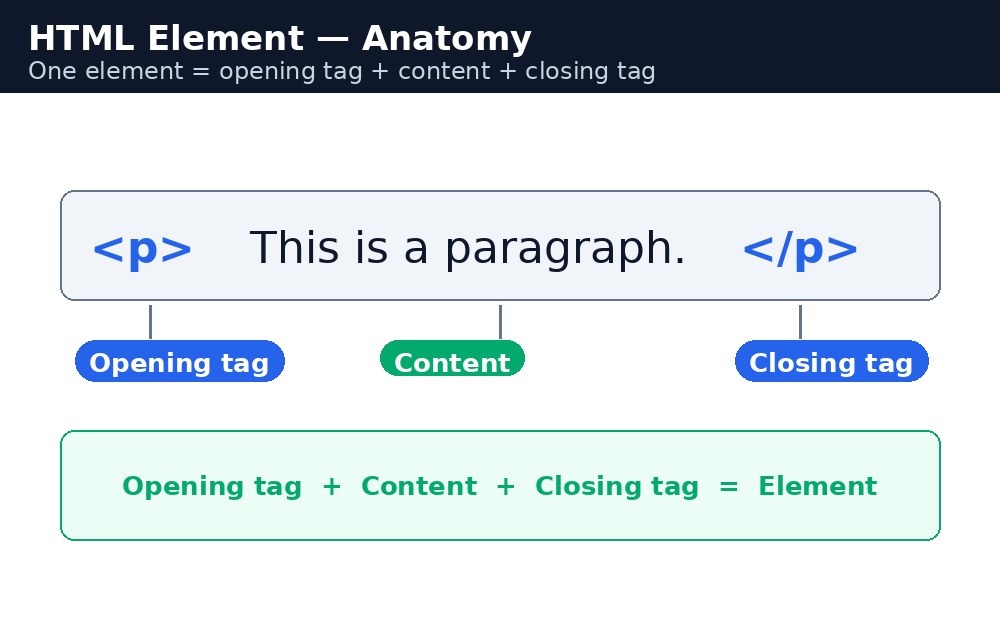
HTML element वह सब कुछ है जो start tag से लेकर end tag तक होता है, बीच का content भी। उदाहरण के लिए, <p>Hello</p> एक पूरा element है: <p> start tag है, Hello content है, और </p> end tag है।
Tags, elements नहीं होते
लोग अक्सर इन दो शब्दों को मिला देते हैं। Tag सिर्फ bracket वाला नाम है, जैसे <h1>। Element पूरी चीज़ है — start tag, content और end tag एक साथ। तो <h1>Welcome</h1> एक element है; अकेला <h1> सिर्फ एक tag है।
Empty elements — खाली एलिमेंट्स
कुछ elements में कोई content नहीं होता और कोई end tag नहीं होता। उन्हें empty elements कहा जाता है। सबसे आम ये हैं:
<br>— एक line break<hr>— एक horizontal line<img>— एक image<input>— एक form field
Nesting — एक के अंदर एक
Elements दूसरे elements के अंदर बैठ सकते हैं। इसे nesting कहा जाता है। अंदर वाला element बाहर वाले से पहले बंद होना चाहिए। सही: <p>This is <strong>important</strong> text.</p>। गलत: <p>This is <strong>important</p></strong> — tags एक-दूसरे को काटते हैं, और browser पेज को गलत दिखा सकता है।
Element क्या है, एक लाइन में
Element एक पूरी इकाई है: एक start tag, tags के बीच का content, और एक end tag। Tag सिर्फ bracket वाला हिस्सा है — <p> एक tag है, लेकिन <p>Hello</p> एक element है। Tags शुरू और अंत को चिह्नित करते हैं; element पूरी चीज़ है, content सहित।
याद रखने की तरकीब: Tag = नाम, Element = पूरी इकाई।
Syntax — element का ढाँचा
<tagname>Content goes here</tagname>
यहाँ दो elements साथ-साथ हैं। पहला text वाला paragraph element है। दूसरा एक empty element है — इसमें कोई content नहीं है और कोई end tag नहीं है।
<p>This is a paragraph element.</p>
<br>
<br>, <hr> और <img> जैसे empty elements का कभी end tag नहीं होता। आप कभी-कभी उन्हें <br /> की तरह slash के साथ लिखा देखेंगे — यह allowed है, लेकिन HTML5 में slash वैकल्पिक है।आम गलतियाँ
- Tags को capital letters में लिखना, जैसे
<P>— HTML इसकी अनुमति देता है, लेकिन छोटे अक्षर standard हैं और हर professional उन्हें ही इस्तेमाल करता है। - Overlapping tags, जैसे
<b><i>text</b></i>— हमेशा अंदर वाला tag पहले बंद करें। - End tag में slash भूल जाना, जैसे
<p>...</p>के बजाय दो बार<p>लिखना। - Empty element में end tag जोड़ना, जैसे
<br></br>—<br>का कभी end tag नहीं होता।
उदाहरण
<!DOCTYPE html>
<html>
<head>
<title>Elements</title>
</head>
<body>

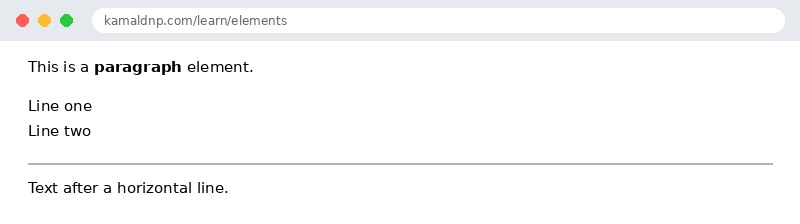
<p>This is a <strong>paragraph</strong> element.</p>
<p>Line one<br>Line two</p>
<hr>
<p>Text after a horizontal line.</p>

</body>
</html>
परिणाम
खुद करके देखें — लाइव एडिटर
नीचे दिया गया कोड बदलें और चलाएँ दबाएँ — परिणाम तुरंत दिखेगा। कोई फाइल सहेजनी नहीं है, कोई लॉगिन नहीं चाहिए।
संबंधित पाठ
अक्सर पूछे जाने वाले सवाल
इस पाठ के बारे में सबसे ज़्यादा पूछे जाने वाले सवाल — सवाल पढ़ें, फिर खोलकर जवाब देखें।
1. HTML एलिमेंट क्या होता है?
एलिमेंट में स्टार्ट टैग से लेकर एंड टैग तक सब कुछ आता है, बीच का कंटेंट भी। जैसे पैराग्राफ़ एलिमेंट में p टैग, टेक्स्ट और बंद करने वाला p टैग होता है।
2. टैग और एलिमेंट में क्या फ़र्क है?
टैग सिर्फ़ ब्रैकेट वाला नाम है, जैसे h1। एलिमेंट पूरा होता है: स्टार्ट टैग, कंटेंट और एंड टैग, तीनों मिलकर।
3. खाली एलिमेंट (empty element) क्या है?
जिस एलिमेंट में न कंटेंट होता है, न एंड टैग। जैसे br लाइन बदलता है, hr एक सीधी लाइन खींचता है और img तस्वीर दिखाता है।
Check yourself — did you get it?
Finished the lesson? Test yourself with 5 quick questions — you get the answer instantly, with the reason for each one.
1. What is an HTML element?
2. Which of these is an empty element?
3. What is nesting?
4. Which nesting is correct?
5. What is the difference between a tag and an element?
Interview questions — can you answer these?
Read the question first, try to answer it in your own words, then open it to check. These are the questions interviewers actually ask.
1. What is the difference between a tag and an element?
A tag is just the bracketed name, like <h1>. An element is the whole thing — start tag, content and end tag together. <h1>Welcome</h1> is an element; <h1> alone is only a tag.
2. What is an empty element? Give two examples.
An element with no content and no end tag. Examples: <br> (line break) and <img> (image). They never take an end tag.
3. What is nesting, and what is the rule for closing nested tags?
Nesting is putting one element inside another. The rule: close tags in the opposite order you opened them — the last tag opened is the first one closed. <p>This is <strong>important</strong> text.</p> is correct; overlapping tags are wrong.
Try it yourself — build this
Reading is not enough — now build it yourself. Write the code in the live editor, run it, check the hint if you get stuck, and open the solution only after you have tried.
1. Nest it right
Create a paragraph that says "My favourite subject is HTML." — with the word HTML inside a <strong> tag, correctly nested inside the <p>. Then add a <br> and a second paragraph.
Show solution
<!DOCTYPE html>
<html>
<head>
<title>My Favourite Subject</title>
</head>
<body>
<p>My favourite subject is <strong>HTML</strong>.</p>
<br>
<p>I am learning it one lesson at a time.</p>
</body>
</html>
खुद क्यों सीखें — AI से पूछने के बजाय?
AI आपके लिए कोड लिख सकता है, लेकिन वह आपके लिए सोच नहीं सकता। जब आप HTML खुद सीखते हैं, तो आपका दिमाग असली कौशल बनाता है: आप समझते हैं कि पेज ऐसा क्यों दिखता है, टूटने पर उसे ठीक कर सकते हैं, और परीक्षा या इंटरव्यू में बिना मदद के जवाब दे सकते हैं। यही कौशल नौकरी दिलाता है — कॉपी किया हुआ जवाब नहीं।
सर्टिफिकेट पाएँ — सिर्फ ₹10
सभी 35 पाठ पूरे करें, टेस्ट पास करें (80%), ₹10 दें और अपना सर्टिफिकेट पाएँ।
टेस्ट देंदेखकर सीखना पसंद है? वीडियो कोर्स में वही विषय एक-एक करके सिखाए जाते हैं।
Go further with a full course
Free tutorials teach you the basics. Our paid courses add live projects, mentorship and a certificate.
Browse all courses