HTML Block and Inline Elements
2 min read · Free · No login needed
Every HTML element is either block-level or inline. The difference is simple but fundamental: a block element always starts on a new line and takes up the full width available. An inline element only takes up as much width as it needs, and it sits in the same line as its neighbours.
Block-level elements
Common block elements: <div>, <p>, <h1>–<h6>, <ul>, <li>, <table>, <form>, <section>. A block element stacks vertically — one below the other — unless you change that with CSS.
Inline elements
Common inline elements: <span>, <a>, <strong>, <em>, <img>, <input>, <button>. Inline elements flow inside a line of text, like words in a sentence. You can put five links in a row and they will sit side by side.
Why it matters
Two rules follow from this: a block element can contain inline elements and other block elements, but an inline element should only contain other inline elements (and text). And you cannot set a width or height on an inline element directly — CSS ignores it unless you change the element's display to block or inline-block.
<div> is the generic block container and <span> is the generic inline container. They have no meaning of their own — they exist so you can group things for styling. Use them when no more specific tag fits.Example
<!DOCTYPE html>
<html>
<head>
<title>Block and Inline</title>
</head>
<body>

<div style="background: #ffe0cc;">This div is a block — it takes the full width.</div>
<div style="background: #cce5ff;">This div starts on a new line.</div>
<p>This is a paragraph with <span style="color: red;">a red span inside it</span> — the span stays in the same line.</p>

</body>
</html>
Output
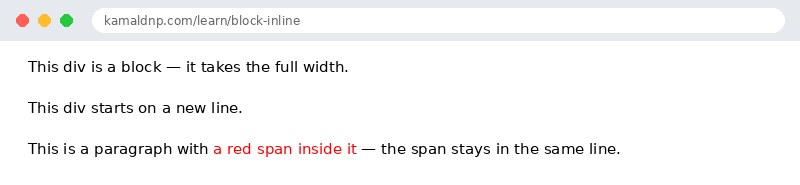
test.html, open it in your browser, and change the text to see what happens. That is how you learn — by changing things and watching the result.Get certified — just ₹10
Finish all 30 lessons, pass the test (80%), pay ₹10 and get your certificate.
Take the testGo further with a full course
Free tutorials teach you the basics. Our paid courses add live projects, mentorship and a certificate.
Browse all courses