HTML Colors
2 min read · Free · No login needed
HTML colours are set with CSS. You can write a colour as a name (red), a hex code (#ff0000), an RGB value (rgb(255, 0, 0)), or an HSL value (hsl(0, 100%, 50%)). All four describe the same red — they are just different ways of writing it.
Hex codes — the most used
A hex code starts with # followed by six characters: two for red, two for green, two for blue. Each pair goes from 00 (none) to FF (full). So #000000 is black, #ffffff is white, and #e13611 is the orange-red used on this website. Hex codes are exact, short, and every designer uses them.
RGB and RGBA
rgb(255, 0, 0) means red 255, green 0, blue 0. Each number runs from 0 to 255. Add a fourth number for transparency: rgba(255, 0, 0, 0.5) is the same red at 50% opacity, so whatever is behind it shows through.
HSL — the human way
HSL stands for Hue, Saturation, Lightness. Hue is the colour on a wheel (0 = red, 120 = green, 240 = blue). Saturation is how strong the colour is. Lightness is how bright it is. Many designers prefer HSL because it is easier to think in: "make this a bit lighter" just means raising the lightness number.
Choosing colours that look good
Pick one main colour, one dark colour for text, and one accent colour for buttons and links. Keep the contrast high — dark text on a light background is the easiest to read. A good free tool is Google's colour picker or coolors.co, where you can test combinations before using them.
Example
<!DOCTYPE html>
<html>
<head>
<title>Colors</title>
</head>
<body>

<p style="color: #e13611;">Orange-red text (hex).</p>
<p style="background-color: rgb(255, 235, 200);">Light orange background (RGB).</p>
<p style="color: hsl(210, 80%, 40%);">Blue text (HSL).</p>

</body>
</html>
Output
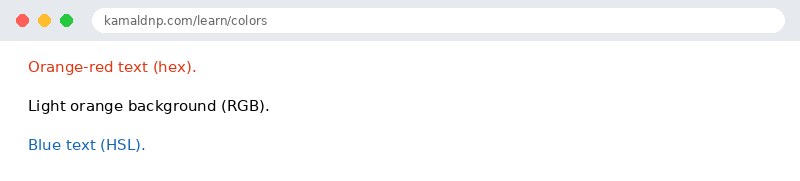
test.html, open it in your browser, and change the text to see what happens. That is how you learn — by changing things and watching the result.Get certified — just ₹10
Finish all 30 lessons, pass the test (80%), pay ₹10 and get your certificate.
Take the testGo further with a full course
Free tutorials teach you the basics. Our paid courses add live projects, mentorship and a certificate.
Browse all courses