HTML CSS
2 min read · Free · No login needed
CSS (Cascading Style Sheets) is the language that controls how a web page looks: colours, fonts, spacing, layout. HTML builds the structure; CSS paints it. There are three ways to add CSS to a page.
1. Inline CSS
Written in the style attribute of one element: <p style="color: red;">. Quick for testing, but bad for real pages — the same style must be repeated on every element.
2. Internal CSS
Written once inside a <style> element in the <head>. It applies to the whole page. Good for a single page, but every page needs its own copy.
3. External CSS (the right way)
Written in a separate .css file and linked from the page: <link rel="stylesheet" href="styles.css">. One file styles the whole website. Change one line in the CSS file and every page updates at once. This is how every professional website works — including kamaldnp.com.
How CSS selects elements
A CSS rule has a selector and a declaration. The selector says which elements to style; the declaration says how. For example, h1 { color: navy; } makes every h1 navy. .intro { font-size: 18px; } styles every element with class "intro". #header { background: orange; } styles the one element with id "header".
Example
<!DOCTYPE html>
<html>
<head>
<title>CSS</title>
<style>
h1 { color: navy; }
.intro { color: green; font-size: 18px; }
</style>
</head>
<body>

<h1>Styled Heading</h1>
<p class="intro">This paragraph uses a class.</p>
<p style="color: red;">This one uses inline CSS.</p>

</body>
</html>
Output
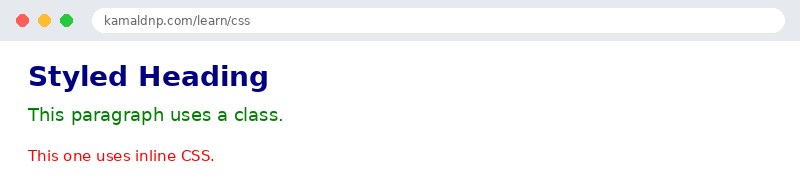
test.html, open it in your browser, and change the text to see what happens. That is how you learn — by changing things and watching the result.Get certified — just ₹10
Finish all 30 lessons, pass the test (80%), pay ₹10 and get your certificate.
Take the testGo further with a full course
Free tutorials teach you the basics. Our paid courses add live projects, mentorship and a certificate.
Browse all courses