HTML Elements
2 min read · Free · No login needed
An HTML element is everything from the start tag to the end tag, including the content in between. For example, <p>Hello</p> is one complete element: <p> is the start tag, Hello is the content, and </p> is the end tag.
Tags are not elements
People often mix up the two words. A tag is just the bracketed name, like <h1>. An element is the whole thing — start tag, content, and end tag together. So <h1>Welcome</h1> is an element; <h1> alone is only a tag.
Empty elements
Some elements have no content and no end tag. They are called empty elements. The most common ones are:
<br>— a line break<hr>— a horizontal line<img>— an image<input>— a form field
Nesting
Elements can sit inside other elements. This is called nesting. The inner element must close before the outer one does. Correct: <p>This is <strong>important</strong> text.</p>. Wrong: <p>This is <strong>important</p></strong> — the tags cross over, and browsers may show the page wrongly.
Example
<!DOCTYPE html>
<html>
<head>
<title>Elements</title>
</head>
<body>

<p>This is a <strong>paragraph</strong> element.</p>
<p>Line one<br>Line two</p>
<hr>
<p>Text after a horizontal line.</p>

</body>
</html>
Output
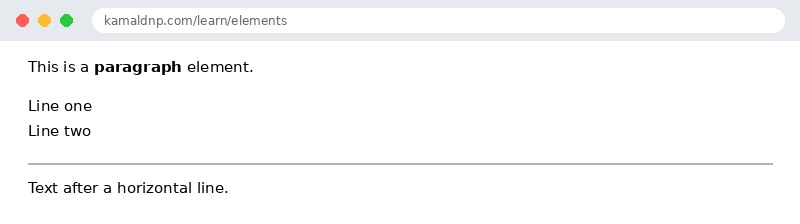
test.html, open it in your browser, and change the text to see what happens. That is how you learn — by changing things and watching the result.Get certified — just ₹10
Finish all 30 lessons, pass the test (80%), pay ₹10 and get your certificate.
Take the testGo further with a full course
Free tutorials teach you the basics. Our paid courses add live projects, mentorship and a certificate.
Browse all courses