Lesson 9 of 30
HTML Formatting
1 min read · Free · No login needed
HTML has special tags that change how text looks and what it means. The two most used are <strong> for important text (shown bold) and <em> for emphasised text (shown italic).
Bold and italic — the right way
You may also see <b> and <i>. They look the same on screen — bold and italic — but they carry no meaning. <strong> tells the browser and search engines "this is important". <em> says "stress this word when reading aloud". Screen readers for blind users actually change their voice for strong and em, but not for b and i. So use strong and em in your pages.
Other useful formatting tags
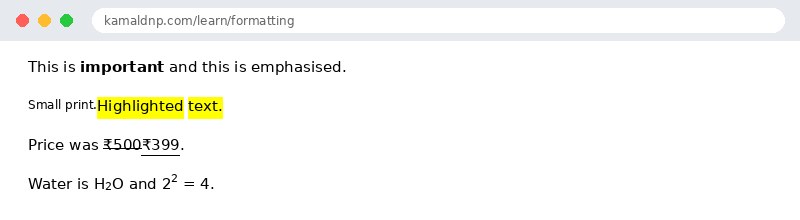
<small>— smaller text, often used for fine print.<mark>— highlighted text, like a yellow marker pen.<del>— struck-through text (something removed).<ins>— underlined text (something added).<sub>— subscript, like the 2 in H2O.<sup>— superscript, like the 2 in x2.
Tip: Formatting tags are for meaning, not decoration. If you only want a visual effect — for example, red text — use CSS instead.
Example
Example
<!DOCTYPE html>
<html>
<head>
<title>Formatting</title>
</head>
<body>

<p>This is <strong>important</strong> and this is <em>emphasised</em>.</p>
<p><small>Small print.</small> <mark>Highlighted text.</mark></p>
<p>Price was <del>₹500</del> <ins>₹399</ins>.</p>
<p>Water is H<sub>2</sub>O and 2<sup>2</sup> = 4.</p>

</body>
</html>
Output
Try it yourself: copy the code above into a file named
test.html, open it in your browser, and change the text to see what happens. That is how you learn — by changing things and watching the result.Get certified — just ₹10
Finish all 30 lessons, pass the test (80%), pay ₹10 and get your certificate.
Take the testGo further with a full course
Free tutorials teach you the basics. Our paid courses add live projects, mentorship and a certificate.
Browse all courses