HTML Forms
2 min read · Free · No login needed
Forms are how a website collects information: a login, a signup, a contact message, a search box, a payment. The <form> tag wraps all the fields, and when the visitor clicks submit, the browser sends the data to the server address in the form's action attribute.
The input types you will use most
text— a single line of text (name, city).email— an email address; the browser checks the format for you.password— hides the characters as you type.number— numbers only, with up/down arrows.tel— a phone number; on mobile it opens the number keyboard.date— a date picker.radio— pick one option from a group.checkbox— pick any number of options.
Labels — never skip them
Every input needs a <label> connected with the for attribute matching the input's id: <label for="email">Email</label> <input type="email" id="email" name="email">. The label does two things: it tells the visitor what to type, and clicking it focuses the field. Without labels, a form is confusing — and screen readers cannot explain it at all.
Other form elements
<textarea> is for multi-line text (a message). <select> with <option> children is a dropdown. <button type="submit"> sends the form. The required attribute makes a field compulsory — the browser refuses to submit until it is filled.
name attribute is what the server sees. Two fields with the same name will overwrite each other. Always give every input a name — an input without one sends nothing.Example
<!DOCTYPE html>
<html>
<head>
<title>Forms</title>
</head>
<body>

<form action="/submit.php" method="post">
<label for="name">Your Name:</label><br>
<input type="text" id="name" name="name" required><br><br>
<label for="email">Email:</label><br>
<input type="email" id="email" name="email" required><br><br>
<label for="course">Course:</label><br>
<select id="course" name="course">
<option value="html">HTML</option>
<option value="css">CSS</option>
<option value="js">JavaScript</option>
</select><br><br>
<button type="submit">Submit</button>
</form>

</body>
</html>
Output
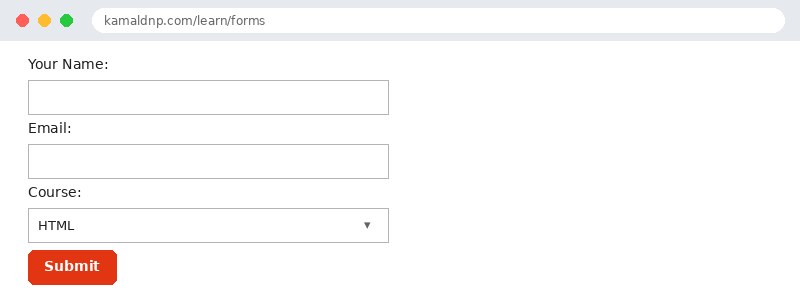
test.html, open it in your browser, and change the text to see what happens. That is how you learn — by changing things and watching the result.Get certified — just ₹10
Finish all 30 lessons, pass the test (80%), pay ₹10 and get your certificate.
Take the testGo further with a full course
Free tutorials teach you the basics. Our paid courses add live projects, mentorship and a certificate.
Browse all courses