HTML Headings
2 min read · Free · No login needed
Headings give a page its structure. They tell the reader — and Google — what each section is about. HTML has six heading levels, from <h1> (the biggest and most important) to <h6> (the smallest).
How to use them
<h1>— the main title of the page. Use it only once per page.<h2>— the main sections of the page.<h3>— sub-sections inside an h2 section.<h4>to<h6>— deeper sub-sections, used rarely.
Think of a book: h1 is the book title, h2 is a chapter, h3 is a section inside the chapter. Skipping levels — for example, jumping from h1 straight to h4 — confuses both readers and search engines.
Headings are not for big text
A common beginner mistake is using a heading tag only to make text big. Headings are about meaning, not size. If you want big text that is not a heading, use CSS to change the font size. Search engines give real weight to headings, so a page with a clear h1, h2, h3 structure ranks better than a page where every line is an h1.
Example
<!DOCTYPE html>
<html>
<head>
<title>Headings</title>
</head>
<body>

<h1>Learn HTML</h1>
<h2>Chapter 1: Basics</h2>
<h3>What is HTML?</h3>
<h4>A smaller heading</h4>
<h5>Even smaller</h5>
<h6>The smallest heading</h6>

</body>
</html>
Output
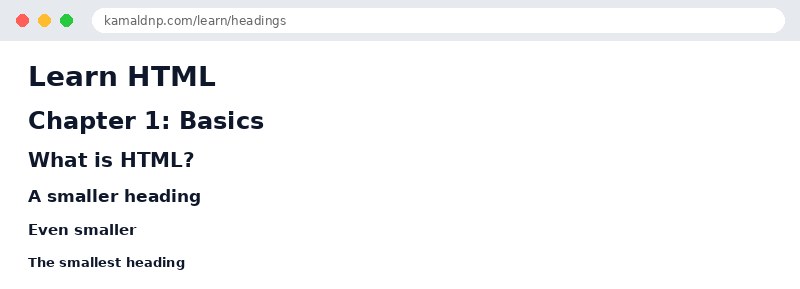
test.html, open it in your browser, and change the text to see what happens. That is how you learn — by changing things and watching the result.Get certified — just ₹10
Finish all 30 lessons, pass the test (80%), pay ₹10 and get your certificate.
Take the testGo further with a full course
Free tutorials teach you the basics. Our paid courses add live projects, mentorship and a certificate.
Browse all courses