Lesson 27 of 30
HTML Layout
2 min read · Free · No login needed
A well-built page is divided into clear sections. HTML gives you semantic layout elements for that — tags whose names say what the section is. Using them makes your page easier to read, better for Google, and easier for screen readers to navigate.
The classic layout
<header>— the top of the page: logo, site name, and usually the navigation.<nav>— the navigation menu, with links to the main pages.<main>— the main content of the page. Only one per page.<section>— a themed group of content inside the main area.<article>— a self-contained piece of content, like a blog post or a news story.<aside>— side content: a sidebar, related links, an ad.<footer>— the bottom of the page: contact details, copyright, extra links.
How it looks in code
The order is almost always the same: header, nav, main (with sections and articles), aside, footer. This pattern is so common that visitors expect it — they look for the menu at the top and the contact details at the bottom without thinking.
Tip: Before writing any code for a new page, sketch the layout on paper — a rectangle for the header, one for the menu, a big one for the content, a small one for the sidebar, one for the footer. Then write one tag per rectangle. The code almost writes itself.
Example
Example
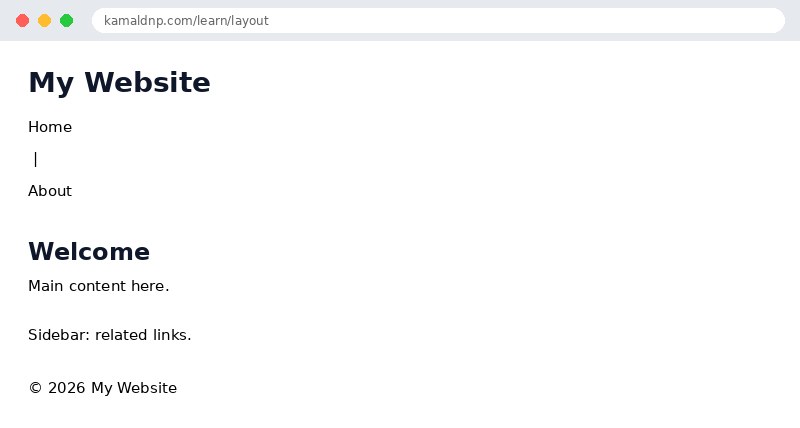
<!DOCTYPE html>
<html>
<head>
<title>Layout</title>
</head>
<body>

<header><h1>My Website</h1></header>
<nav><a href="#">Home</a> | <a href="#">About</a></nav>
<main>
<section><h2>Welcome</h2><p>Main content here.</p></section>
<aside><p>Sidebar: related links.</p></aside>
</main>
<footer><p>© 2026 My Website</p></footer>

</body>
</html>
Output
Try it yourself: copy the code above into a file named
test.html, open it in your browser, and change the text to see what happens. That is how you learn — by changing things and watching the result.Get certified — just ₹10
Finish all 30 lessons, pass the test (80%), pay ₹10 and get your certificate.
Take the testGo further with a full course
Free tutorials teach you the basics. Our paid courses add live projects, mentorship and a certificate.
Browse all courses