HTML Links
2 min read · Free · No login needed
Links are what make the web a web. The <a> tag (short for anchor) creates a link, and the href attribute says where it goes. The text between the tags is what the visitor clicks.
Types of links
- External link — to another website:
<a href="https://kamaldnp.com">KAMALDNP</a>. Always use the full address starting withhttps://. - Internal link — to another page on your own site:
<a href="about.html">About Us</a>. Use a relative path, no domain needed. - Link to a section — to an element with an id on the same page:
<a href="#contact">Jump to Contact</a>. - Email link — opens the visitor's email app:
<a href="mailto:support@kamaldnp.com">Email Us</a>. - Phone link — starts a call on mobile:
<a href="tel:+918318013442">Call Us</a>.
Opening a link in a new tab
Add target="_blank" and, for safety, rel="noopener": <a href="https://example.com" target="_blank" rel="noopener">Open in new tab</a>. Use this for external links, so your visitor does not leave your site. For links inside your own site, let them open in the same tab.
Link text matters
Write link text that describes the destination: "Download the BTEUP syllabus" is good; "click here" is bad. Google reads link text to understand what the linked page is about, and screen-reader users often jump from link to link without reading the surrounding words.
<img> tag between the <a> tags.Example
<!DOCTYPE html>
<html>
<head>
<title>Links</title>
</head>
<body>

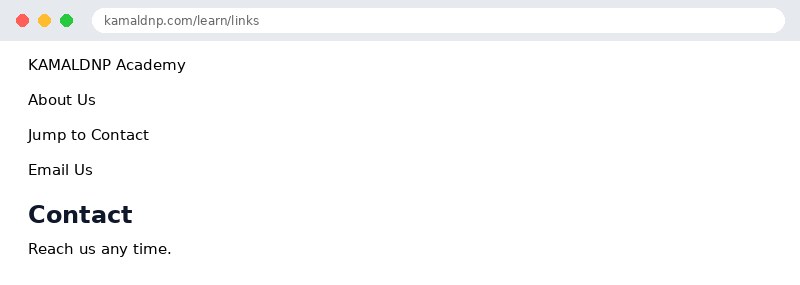
<a href="https://kamaldnp.com">KAMALDNP Academy</a><br>
<a href="about.html">About Us</a><br>
<a href="#contact">Jump to Contact</a><br>
<a href="mailto:support@kamaldnp.com">Email Us</a>
<h2 id="contact">Contact</h2>
<p>Reach us any time.</p>

</body>
</html>
Output
test.html, open it in your browser, and change the text to see what happens. That is how you learn — by changing things and watching the result.Get certified — just ₹10
Finish all 30 lessons, pass the test (80%), pay ₹10 and get your certificate.
Take the testGo further with a full course
Free tutorials teach you the basics. Our paid courses add live projects, mentorship and a certificate.
Browse all courses