HTML Lists
2 min read · Free · No login needed
Lists group related items together. HTML has three kinds: unordered lists (<ul>) with bullets, ordered lists (<ol>) with numbers, and description lists (<dl>) with terms and their meanings. Each item in the first two is an <li> element.
Unordered lists — ul
Use <ul> when the order does not matter: a shopping list, a set of features, a navigation menu. The browser shows a bullet before each item by default.
Ordered lists — ol
Use <ol> when the order matters: steps in a recipe, the top 5 of anything, instructions. The browser numbers the items automatically — 1, 2, 3. You can change the numbering with the type attribute (type="A" gives A, B, C; type="i" gives i, ii, iii) and start from any number with start="5".
Description lists — dl
Use <dl> for name-value pairs: a glossary, a FAQ, or a list of terms. Each term is a <dt> and each description is a <dd>.
Nesting lists
A list can sit inside a list item. This is how multi-level menus are built: a <ul> inside an <li> of another <ul>. Just remember to close the inner list before closing the item that holds it.
Example
<!DOCTYPE html>
<html>
<head>
<title>Lists</title>
</head>
<body>

<h2>Shopping List</h2>
<ul>
<li>Milk</li>
<li>Bread</li>
<li>Eggs</li>
</ul>

<h2>Steps to Make Tea</h2>
<ol>
<li>Boil water.</li>
<li>Add tea leaves.</li>
<li>Pour and serve.</li>
</ol>

</body>
</html>
Output
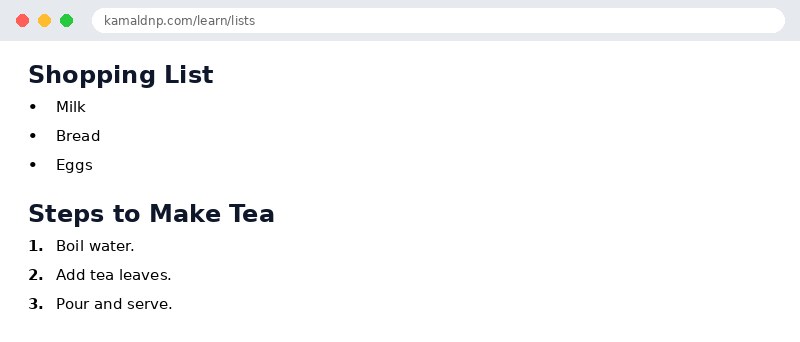
test.html, open it in your browser, and change the text to see what happens. That is how you learn — by changing things and watching the result.Get certified — just ₹10
Finish all 30 lessons, pass the test (80%), pay ₹10 and get your certificate.
Take the testGo further with a full course
Free tutorials teach you the basics. Our paid courses add live projects, mentorship and a certificate.
Browse all courses