HTML Semantics
2 min read · Free · No login needed
Semantic HTML means using tags that describe what the content is, not just how it looks. <article> means "this is a self-contained piece of writing". <nav> means "this is navigation". A <div> means nothing at all. Both can look identical on screen — but to Google and to screen readers, they are very different.
The main semantic tags
<header>,<footer>— top and bottom of a page or a section.<nav>— navigation links.<main>— the main content (one per page).<article>— a blog post, a news story, a product card.<section>— a themed group inside a page.<aside>— side content related to the main content.<figure>and<figcaption>— an image with its caption.<time>— a date or time, in a format machines can read.
Why it matters
Search engines: Google uses semantic tags to understand your page. An article inside an <article> tag is more likely to appear in search results than the same text inside a pile of divs. Accessibility: a blind visitor using a screen reader can jump straight to the <nav> or the <main> content instead of listening to the whole page. Maintenance: six months later, <article> tells you what the code is; <div class="x"> does not.
Example
<!DOCTYPE html>
<html>
<head>
<title>Semantics</title>
</head>
<body>

<header><h1>KAMALDNP Blog</h1></header>
<nav><a href="#">Home</a> | <a href="#">Blog</a></nav>
<main>
<article>
<h2>How to Learn HTML</h2>
<p>Start with the basics, practise every day…</p>
<time datetime="2026-10-27">27 October 2026</time>
</article>
</main>
<footer><p>© 2026 KAMALDNP Academy</p></footer>

</body>
</html>
Output
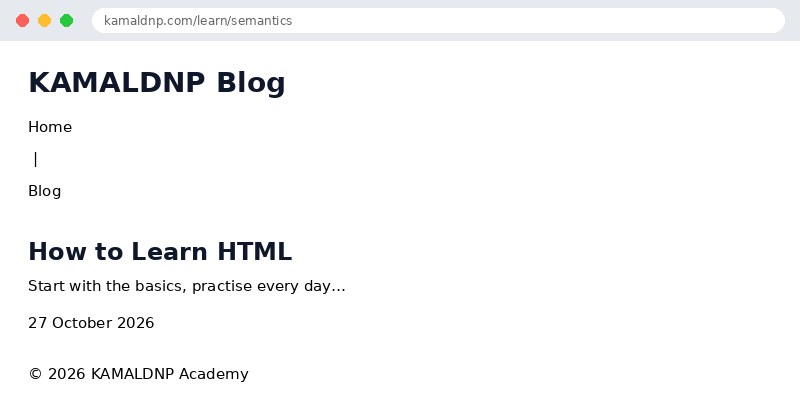
test.html, open it in your browser, and change the text to see what happens. That is how you learn — by changing things and watching the result.Get certified — just ₹10
Finish all 30 lessons, pass the test (80%), pay ₹10 and get your certificate.
Take the testGo further with a full course
Free tutorials teach you the basics. Our paid courses add live projects, mentorship and a certificate.
Browse all courses