HTML Styles
1 min read · Free · No login needed
The style attribute lets you add CSS directly to an HTML element. It is called inline styling. It is the quickest way to change how one element looks, and it is perfect for learning, because you see the result immediately.
What you can change
- Text colour:
style="color: red;" - Background colour:
style="background-color: yellow;" - Font size:
style="font-size: 20px;" - Font family:
style="font-family: Arial;" - Alignment:
style="text-align: center;"
Each style is written as property: value; and multiple styles are separated by semicolons: style="color: white; background-color: navy; font-size: 18px;".
When to use it — and when not to
Inline styles are good for quick experiments and for one-off changes. But if ten elements on your page need the same look, writing the same style ten times is wasteful. That is what a <style> block or a separate CSS file is for — you will learn both in the HTML CSS lesson.
red), as hex codes (#e13611), or as rgb values (rgb(225, 54, 17)). Hex codes give you exact control.Example
<!DOCTYPE html>
<html>
<head>
<title>Styles</title>
</head>
<body>

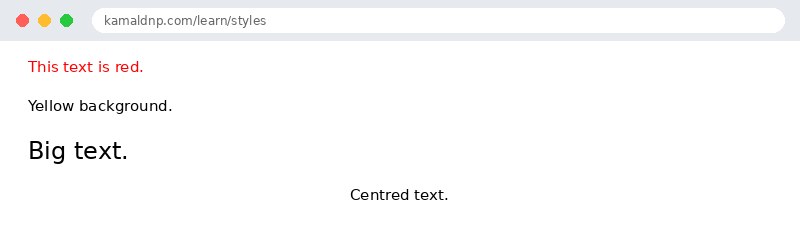
<p style="color: red;">This text is red.</p>
<p style="background-color: yellow;">Yellow background.</p>
<p style="font-size: 24px;">Big text.</p>
<p style="text-align: center;">Centred text.</p>

</body>
</html>
Output
test.html, open it in your browser, and change the text to see what happens. That is how you learn — by changing things and watching the result.Get certified — just ₹10
Finish all 30 lessons, pass the test (80%), pay ₹10 and get your certificate.
Take the testGo further with a full course
Free tutorials teach you the basics. Our paid courses add live projects, mentorship and a certificate.
Browse all courses