HTML Tables
2 min read · Free · No login needed
Tables show data in rows and columns — timetables, price lists, exam schemes, comparison charts. A table is built from four tags: <table> for the whole table, <tr> for each row, <th> for a header cell, and <td> for a normal data cell.
Structure of a table
Every row is a <tr>. Inside a row, you put cells. The first row usually uses <th> (header) cells, which browsers show in bold and centred. All other rows use <td> cells. A table with 3 rows and 3 columns has 3 <tr> elements, each holding 3 cells.
Caption, colspan and rowspan
<caption>— a title for the table, placed right after<table>.colspan="2"— a cell that stretches across 2 columns.rowspan="2"— a cell that stretches across 2 rows.
Tables are for data, not layout
In the old days, websites were laid out with tables. Never do that today — use CSS for layout. Tables are only for real tabular data. A table used for layout is hard to make responsive, and screen readers read it out in a confusing order.
Example
<!DOCTYPE html>
<html>
<head>
<title>Tables</title>
<style>
table, th, td { border: 1px solid #999; border-collapse: collapse; }
th, td { padding: 8px 12px; }
</style>
</head>
<body>

<table>
<caption>Weekly Class Schedule</caption>
<tr><th>Day</th><th>Subject</th><th>Time</th></tr>
<tr><td>Monday</td><td>HTML Basics</td><td>10:00 AM</td></tr>
<tr><td>Tuesday</td><td>CSS Styling</td><td>10:00 AM</td></tr>
</table>

</body>
</html>
Output
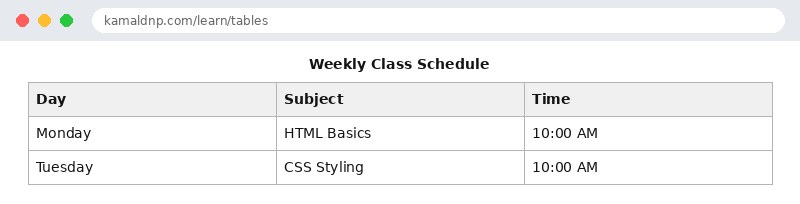
test.html, open it in your browser, and change the text to see what happens. That is how you learn — by changing things and watching the result.Get certified — just ₹10
Finish all 30 lessons, pass the test (80%), pay ₹10 and get your certificate.
Take the testGo further with a full course
Free tutorials teach you the basics. Our paid courses add live projects, mentorship and a certificate.
Browse all courses