JavaScript आउटपुट
5 मिनट पढ़ें · मुफ़्त · बिना लॉगिन
JavaScript को अक्सर नतीजा दिखाना होता है: कुल रकम, कोई संदेश, कोई चेतावनी। इसके चार तरीके हैं, और हर तरीका किसी अलग मौके के लिए है। सही तरीका चुनना ज़रूरी है — गलत चुनाव आपका पूरा पेज मिटा सकता है, या visitor को ऐसे pop-up से परेशान कर सकता है जो उसने माँगा ही नहीं था।
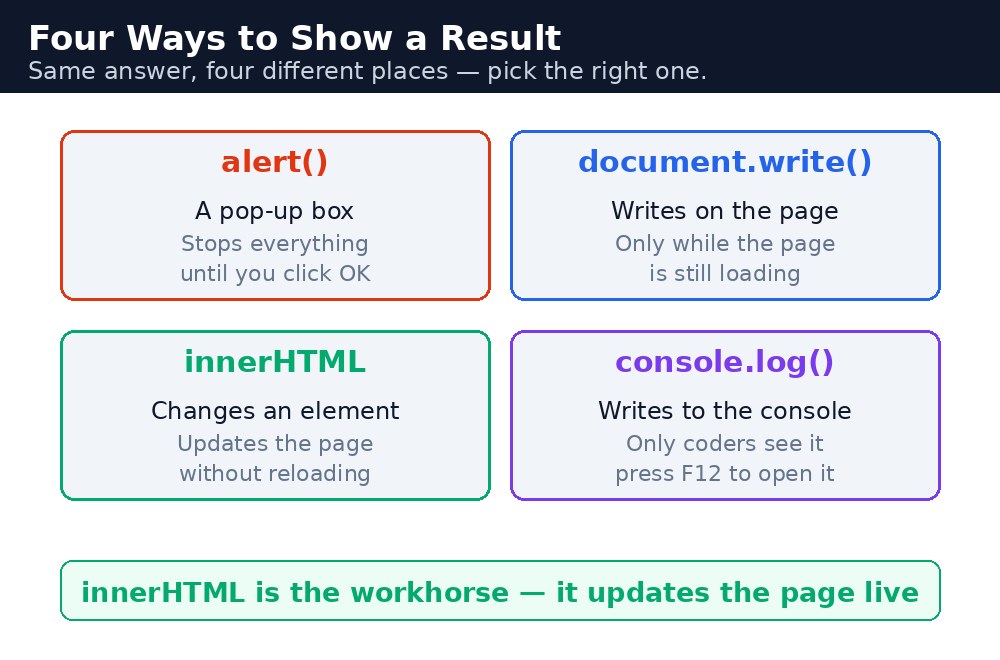
चार तरीके हैं: alert(), जो एक छोटा box दिखाता है; document.write(), जो पेज load होते समय लिखता है; innerHTML, जो पेज का एक हिस्सा बदलता है; और console.log(), जो संदेश सिर्फ आपको, developer को, browser के console में लिखता है। असली वेबसाइटों में innerHTML सबसे ज़्यादा काम आता है — पेज reload किए बिना अपडेट करने का यही तरीका है।
alert() — पॉप-अप बॉक्स
alert("Hello!") सब कुछ रोक देता है और आपके संदेश और OK button वाला एक छोटा box दिखाता है। Visitor को OK दबाना ही पड़ता है, तभी कुछ और होता है। यह testing और ज़रूरी चेतावनियों के लिए अच्छा है, पर इसे कम ही इस्तेमाल कीजिए — जो पेज हर click पर pop-up दिखाता है, उसे लोग बंद कर देते हैं।
alert("Your order is confirmed!");
document.write() — पेज load होते समय लिखना
document.write() सीधे पेज में लिखता है, पर सिर्फ तब जब पेज अभी load हो रहा हो। अगर आप इसे पेज पूरी तरह load होने के बाद बुलाते हैं — जैसे button click से — तो यह पूरा पेज मिटाकर उसकी जगह आपका text रख देता है। यह लगभग कभी भी वह नहीं है जो आप चाहते हैं। इसे सिर्फ छोटे उदाहरणों में इस्तेमाल कीजिए, असली code में कभी नहीं।
<script>
  document.write("Today is a good day for chai.");
</script>
innerHTML — पेज का एक हिस्सा बदलना
innerHTML एक element की content बदलता है, बाकी पेज को छुए बिना। आप element को उसकी id से ढूँढते हैं, फिर उसकी innerHTML को नया text दे देते हैं। नतीजे दिखाने का यही सामान्य तरीका है: कुल रकम, संदेश, चीज़ों की सूची। पेज तुरंत अपडेट हो जाता है, बिना pop-up और बिना reload के।
document.getElementById("total").innerHTML = "Total: ₹40";
इसका एक करीबी रिश्तेदार है textContent, जो सिर्फ सादा text देता है। जब नतीजा सिर्फ शब्द या नंबर हो, तो textContent इस्तेमाल कीजिए, और जब नतीजे में HTML tags — जैसे <b> — डालने हों, तो innerHTML।
console.log() — developer के लिए संदेश
console.log() संदेश browser के console में लिखता है — developers के लिए छिपा हुआ panel। Visitor इसे कभी नहीं देखते। यह अपना काम जाँचने का सबसे अच्छा तरीका है: कोई value print कीजिए, पेज चलाइए, और console में देखिए कि value वही है जो आपने सोची थी। Console खोलने के लिए अपने browser में F12 दबाइए।
console.log("The total is: " + 40);
alert() पेज को तब तक रोकता है जब तक visitor OK नहीं दबाता। अगर आप alert() को loop के अंदर डाल देते हैं, तो visitor को बार-बार OK दबाना पड़ेगा। इसीलिए असली वेबसाइटें इसे लगभग कभी इस्तेमाल नहीं करतीं — पेज पर लिखा संदेश ज़्यादा अच्छा होता है।console.log() को खुलकर इस्तेमाल कीजिए। यह देखने का सबसे तेज़ तरीका है कि आपका code असल में क्या कर रहा है, और यह पेज को कभी परेशान नहीं करता। जब कोई value गलत लगे, तो उसे print कीजिए और जो आपने सोचा था उससे मिलाइए।आम गलतियाँ
- पेज load होने के बाद
document.write()इस्तेमाल करना — यह पूरा पेज मिटा देता है। इसकी जगहinnerHTMLइस्तेमाल कीजिए। - हर संदेश के लिए
alert()इस्तेमाल करना — visitors को pop-ups परेशान करते हैं। नतीजे पेज पर दिखाइए। idभूल जाना —getElementById("total")कुछ नहीं ढूँढता अगर पेज पर कोई elementid="total"वाला नहीं है।console.logलिखकर यह सोचना कि visitors उसे देखेंगे — सिर्फ console खोले हुए developers ही उसे देख सकते हैं।
याद रखें
alert()— pop-up box। ज़रूरी चेतावनियों के लिए अच्छा, रोज़ के संदेशों के लिए खराब।document.write()— सिर्फ पेज load होते समय। उसके बाद कभी नहीं।innerHTML— पेज का एक हिस्सा बदलता है। नतीजे दिखाने का सामान्य तरीका।console.log()— developer के लिए संदेश, browser console (F12) में दिखता है।
उदाहरण समझिए
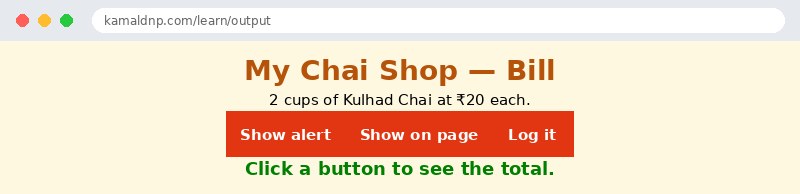
alert("Welcome to My Chai Shop!")— जब "Alert" button पर click होता है, तो welcome संदेश वाला pop-up box दिखता है। OK दबाए जाने तक पेज इंतज़ार करता है।document.getElementById("result").innerHTML = ...— जब "Show on page" button पर click होता है, तोid="result"वाला paragraph bill का कुल बदल देता है, और बाकी पेज बिल्कुल वैसा ही रहता है।console.log("Bill total is ₹40")— जब "Log it" button पर click होता है, तो कुल browser console में लिखा जाता है। पेज पर कुछ नहीं बदलता; देखने के लिए F12 दबाइए।2 * 20— bill है ₹20 वाले 2 कप। JavaScript पहले गणित करता है, फिर जवाब दिखाता है — buttons में कभी hard-coded कुल नहीं होता।- Script के नीचे
document.write("Welcome!")— यह line पेज load होते समय चलती है, इसलिए यह अपना text पेज में सुरक्षित तरीके से लिखती है। इसे यहाँ इसलिए दिखाया गया है ताकि आप इसे काम करते देख सकें; असली code में आप इसकी जगहinnerHTMLइस्तेमाल करेंगे।
उदाहरण
<!DOCTYPE html>
<html>
<head>
<title>Four Ways to Show a Result</title>
<style>
body { background-color: #fff8e1; font-family: Verdana, sans-serif; text-align: center; }
h1 { color: #b45309; }
button { background-color: #e13611; color: white; border: none; padding: 10px 18px; font-size: 15px; cursor: pointer; margin: 4px; }
#result { color: green; font-weight: bold; font-size: 18px; }
</style>
</head>
<body>

<h1>My Chai Shop — Bill</h1>
<p>2 cups of Kulhad Chai at ₹20 each.</p>
<button onclick="showAlert()">Show alert</button>
<button onclick="showOnPage()">Show on page</button>
<button onclick="logIt()">Log it</button>
<p id="result">Click a button to see the total.</p>

<script>
document.write("Welcome to the chai shop bill page. ");
function showAlert() {
  alert("Your bill total is ₹40");
}
function showOnPage() {
  document.getElementById("result").innerHTML = "Total: ₹40";
}
function logIt() {
  console.log("Bill total is ₹40");
}
</script>

</body>
</html>
परिणाम
खुद करके देखें — लाइव एडिटर
नीचे दिया गया कोड बदलें और चलाएँ दबाएँ — परिणाम तुरंत दिखेगा। कोई फाइल सहेजनी नहीं है, कोई लॉगिन नहीं चाहिए।
Check yourself — did you get it?
Finished the lesson? Test yourself with 5 quick questions — you get the answer instantly, with the reason for each one.
1. Which way of showing a result changes one part of the page without reloading it?
2. What does alert() do?
3. What happens if you call document.write() after the page has finished loading?
4. Who can see a console.log() message?
5. What is the difference between innerHTML and textContent?
Interview questions — can you answer these?
Read the question first, try to answer it in your own words, then open it to check. These are the questions interviewers actually ask.
1. What are the four ways JavaScript can show a result, and which one do real websites use most?
alert() pops up a box, document.write() writes while the page is loading, innerHTML changes one part of the page, and console.log() writes a message only the developer can see in the console. Real websites use innerHTML most — it updates part of the page instantly, with no pop-up and no reload. For example, a bill total can appear in a paragraph with document.getElementById("total").innerHTML = "Total: ₹40".
2. What happens if you call document.write() after the page has finished loading?
It erases the whole page and replaces it with your text, because document.write() only works while the page is still loading. That is almost never what you want, so use innerHTML instead — it changes one element and leaves the rest of the page alone. document.write() belongs only in tiny examples, never in real code.
3. What is the difference between innerHTML and textContent, and what is console.log() for?
innerHTML sets content that can include HTML tags, while textContent sets plain text only — use textContent when the result is just words or numbers. console.log() writes a message to the browser's console, a hidden panel for developers that visitors never see. Press F12 to open the console, and use console.log() to check your own values while you are learning.
Try it yourself — build this
Reading is not enough — now build it yourself. Write the code in the live editor, run it, check the hint if you get stuck, and open the solution only after you have tried.
1. Three buttons, three ways to show a result
Create a chai bill page: 3 cups of Masala Chai at ₹15 each (total ₹45). Add three buttons: "Alert total" must show the total with alert(), "Show total" must write "Total: ₹45" into a paragraph with id="result" using innerHTML, and "Log total" must write "Bill total is ₹45" to the console with console.log(). Do NOT hard-code 45 in the buttons — calculate it in JavaScript as 3 * 15, then show the answer.
Show solution
<!DOCTYPE html>
<html>
<head>
<title>Three Ways to Show a Result</title>
<style>
body { background-color: #fff8e1; font-family: Verdana, sans-serif; text-align: center; }
h1 { color: #b45309; }
button { background-color: #e13611; color: white; border: none; padding: 10px 18px; font-size: 15px; cursor: pointer; margin: 4px; }
#result { color: green; font-weight: bold; font-size: 18px; }
</style>
</head>
<body>

<h1>My Chai Shop — Bill</h1>
<p>3 cups of Masala Chai at ₹15 each.</p>
<button onclick="showAlert()">Alert total</button>
<button onclick="showOnPage()">Show total</button>
<button onclick="logIt()">Log total</button>
<p id="result">Click a button to see the total.</p>

<script>
function showAlert() {
  let total = 3 * 15;
  alert("Your bill total is ₹" + total);
}
function showOnPage() {
  let total = 3 * 15;
  document.getElementById("result").innerHTML = "Total: ₹" + total;
}
function logIt() {
  let total = 3 * 15;
  console.log("Bill total is ₹" + total);
}
</script>

</body>
</html>खुद क्यों सीखें — AI से पूछने के बजाय?
AI आपके लिए कोड लिख सकता है, लेकिन वह आपके लिए सोच नहीं सकता। जब आप HTML खुद सीखते हैं, तो आपका दिमाग असली कौशल बनाता है: आप समझते हैं कि पेज ऐसा क्यों दिखता है, टूटने पर उसे ठीक कर सकते हैं, और परीक्षा या इंटरव्यू में बिना मदद के जवाब दे सकते हैं। यही कौशल नौकरी दिलाता है — कॉपी किया हुआ जवाब नहीं।
सर्टिफिकेट पाएँ — सिर्फ ₹10
सभी 30 पाठ पूरे करें, टेस्ट पास करें (80%), ₹10 दें और अपना सर्टिफिकेट पाएँ।
टेस्ट देंदेखकर सीखना पसंद है? वीडियो कोर्स में वही विषय एक-एक करके सिखाए जाते हैं।
Go further with a full course
Free tutorials teach you the basics. Our paid courses add live projects, mentorship and a certificate.
Browse all courses