HTML Div
2 min read · Free · No login needed
The <div> tag is the most used element in web design. It is a generic block-level container: it has no meaning of its own, it adds no styling by itself, and it simply groups other elements together so you can style them or move them as one unit.
What divs are for
- Layout: dividing a page into header, sidebar, main content, and footer areas.
- Grouping: wrapping a heading, a paragraph, and a button that belong together — for example, one course card.
- Styling: giving a group a background, a border, padding, or a width through a class.
- JavaScript: giving a group an id so a script can show it, hide it, or change it.
Divs and meaning
Because a div means nothing, use it only when no better tag exists. A page header should be a <header>, a navigation menu a <nav>, the main content a <main>, and an article an <article>. These semantic tags (you will learn them in the Semantics lesson) help search engines and screen readers understand your page. Divs fill in the gaps between them.
Example
<!DOCTYPE html>
<html>
<head>
<title>Div</title>
<style>
.card { border: 1px solid #ccc; padding: 16px; border-radius: 8px; }
</style>
</head>
<body>

<div class="card">
<h2>HTML Course</h2>
<p>Learn HTML from scratch, free.</p>
<button>Start Learning</button>
</div>

</body>
</html>
Output
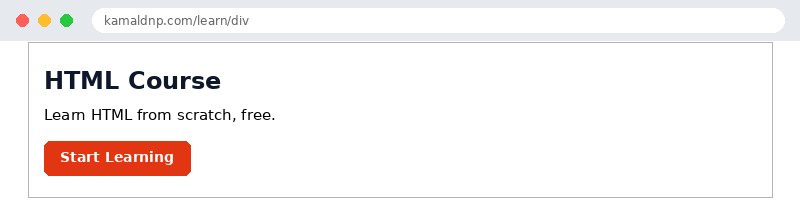
test.html, open it in your browser, and change the text to see what happens. That is how you learn — by changing things and watching the result.Get certified — just ₹10
Finish all 30 lessons, pass the test (80%), pay ₹10 and get your certificate.
Take the testGo further with a full course
Free tutorials teach you the basics. Our paid courses add live projects, mentorship and a certificate.
Browse all courses