HTML Paragraphs
2 min read · Free · No login needed
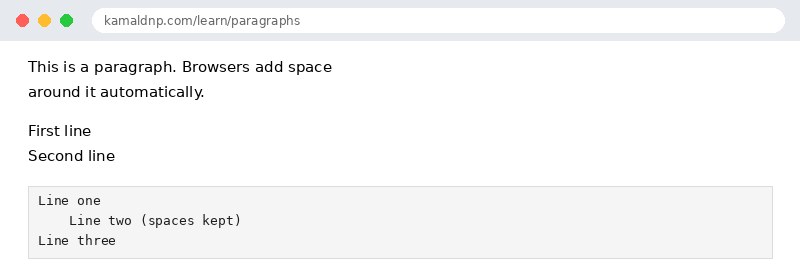
The <p> tag defines a paragraph. Browsers automatically add a blank line before and after each paragraph, so your text stays readable without you adding space yourself.
Spaces and new lines are collapsed
This surprises every beginner: in HTML, extra spaces and line breaks in your code are ignored. If you type ten spaces, the browser shows one. If you press Enter three times, the browser shows no line break at all. The browser only cares about the tags, not about how you formatted the source code.
Line breaks — the br tag
When you want a line break without starting a new paragraph — for example, in an address or a poem — use <br>. It is an empty element, so it has no closing tag.
Preformatted text — the pre tag
Sometimes you want the browser to keep your spaces and line breaks exactly as typed — for example, in a piece of code. The <pre> tag does that. Everything inside it is shown in a fixed-width font, exactly as you wrote it.
<br> tags in a row to create space between paragraphs. Use a new <p> and let CSS control the spacing — it is cleaner and easier to change later.Example
<!DOCTYPE html>
<html>
<head>
<title>Paragraphs</title>
</head>
<body>

<p>This is a paragraph. Browsers add space
around it automatically.</p>
<p>First line<br>Second line</p>
<pre>
Line one
    Line two (spaces kept)
Line three
</pre>

</body>
</html>
Output
test.html, open it in your browser, and change the text to see what happens. That is how you learn — by changing things and watching the result.Get certified — just ₹10
Finish all 30 lessons, pass the test (80%), pay ₹10 and get your certificate.
Take the testGo further with a full course
Free tutorials teach you the basics. Our paid courses add live projects, mentorship and a certificate.
Browse all courses