JavaScript Timers — setTimeout और setInterval
3 मिनट पढ़ें · मुफ़्त · बिना लॉगिन
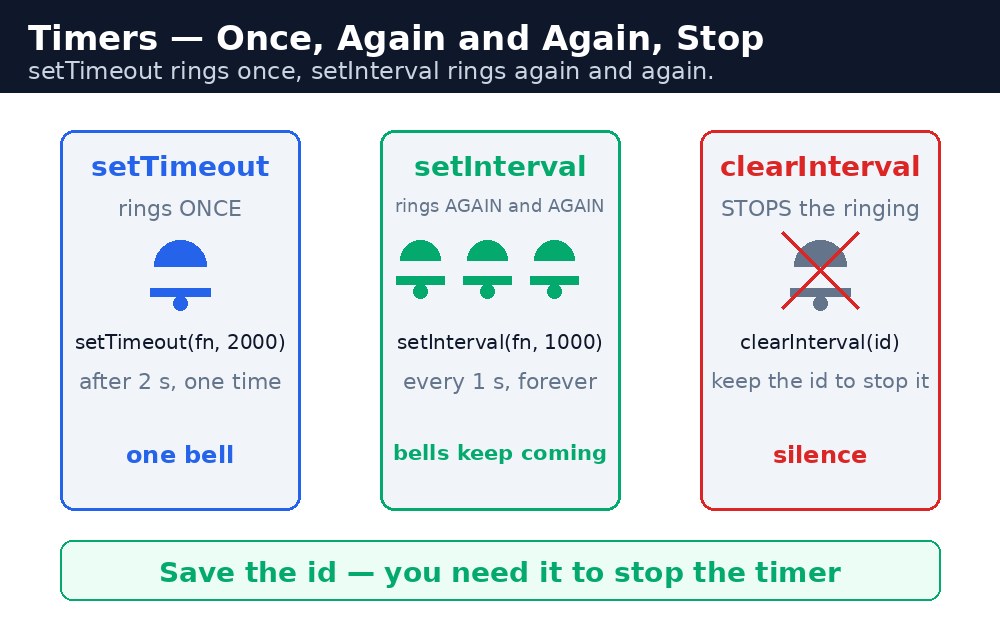
कभी-कभी code को अभी नहीं चलना चाहिए — उसे बाद में चलना चाहिए। 3 सेकंड बाद दिखने वाला message, हर 5 सेकंड में बदलने वाला slideshow, शून्य तक नीचे गिनने वाला countdown। JavaScript के पास इसके लिए दो timer हैं: setTimeout एक function को एक बार, देरी के बाद चलाता है। setInterval एक function को बार-बार चलाता है, हर इतने milliseconds पर। दोनों सरल हैं, लेकिन दोनों का एक नियम beginners भूल जाते हैं: वे अपने आप कभी नहीं रुकते।
setTimeout — एक बार, बाद में
setTimeout(() => {
  console.log("3 seconds are over!");
}, 3000);
पहला argument वह function है जिसे चलाना है, दूसरा देरी है milliseconds में: 1000 milliseconds मतलब 1 सेकंड, इसलिए 3000 मतलब 3 सेकंड। setTimeout पेज को रोकता नहीं है — उसके बाद का code तुरंत चलता है, और function बाद में, background में चलता है। इसे alarm लगाने जैसा समझिए: आप alarm लगाते हैं और अपना काम करते रहते हैं, और समय आने पर वह बज जाता है।
Date.now()) से तुलना कीजिए।setInterval — बार-बार
let seconds = 10;
let timerId = setInterval(() => {
  seconds = seconds - 1;
  console.log(seconds);
  if (seconds === 0) {
    clearInterval(timerId);
  }
}, 1000);
setInterval एक id देता है — एक number जो उस timer का नाम है। इसे संभालकर रखिए, क्योंकि timer रोकने का यही एक तरीका है: clearInterval(timerId) उसे बंद कर देता है। setTimeout का भी यही pattern है: वह भी id देता है, और clearTimeout(id) alarm बजने से पहले उसे रद्द कर देता है। जो timer कभी रोका ही नहीं गया, वह हमेशा चलता रहता है, चुपचाप पेज का ध्यान खाता हुआ — यही मशहूर "मेरा पेज धीमा हो गया" वाला bug है।
आम गलतियाँ
setTimeout(sayHi(), 1000)लिखना — bracketssayHiको तुरंत चला देते हैं; function खुद pass कीजिए:setTimeout(sayHi, 1000)।- id सहेजना भूल जाना — उसके बिना
clearIntervaltimer को रोक ही नहीं सकता। - Interval को कभी clear न करना — काम खत्म होने के बाद भी वह हमेशा चलता रहता है।
- सटीक timing पर भरोसा करना — timer late चल सकते हैं; असली घड़ियों के लिए
Date.now()इस्तेमाल कीजिए।
याद रखें
setTimeout(fn, ms),fnकोmsmilliseconds बाद एक बार चलाता है।setInterval(fn, ms),fnको हरmsmilliseconds पर चलाता है।- दोनों एक id देते हैं;
clearTimeout(id)औरclearInterval(id)उन्हें रोकते हैं। - function pass कीजिए, call नहीं:
setTimeout(sayHi, 1000), न किsetTimeout(sayHi(), 1000)। - हर timer को अपना off switch चाहिए।
उदाहरण समझिए
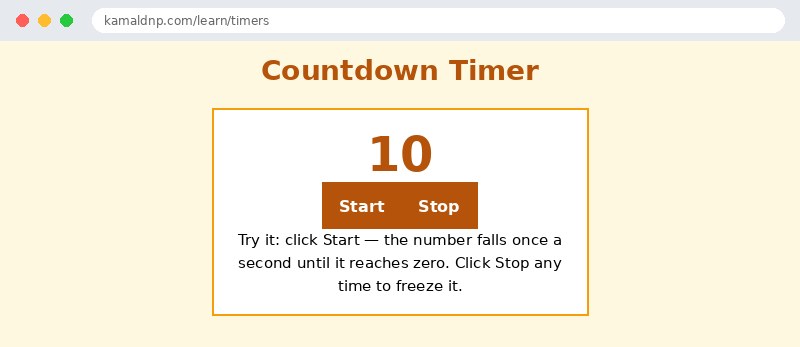
let count = 10;— countdown 10 से शुरू होता है।timerId = setInterval(() => { ... }, 1000);— function हर 1000 milliseconds पर चलता है, और उसकी id सहेज ली जाती है।count = count - 1;— हर tick पर count में से एक कम हो जाता है।document.getElementById("count").textContent = count;— पेज हर सेकंड नया number दिखाता है।if (count === 0) { clearInterval(timerId); }— शून्य पर timer खुद को बंद कर लेता है, ताकि वह हमेशा न चलता रहे। Stop button भीclearInterval(timerId)ही बुलाता है।
उदाहरण
<!DOCTYPE html>
<html>
<head>
<title>Countdown Timer</title>
<style>
body { font-family: Verdana, sans-serif; background-color: #fff8e1; }
h1 { color: #b45309; text-align: center; }
.card { background-color: white; border: 2px solid #f59e0b; padding: 16px; width: 340px; margin: 20px auto; text-align: center; }
button { background-color: #b45309; color: white; border: none; padding: 10px 18px; font-size: 16px; }
#count { font-size: 48px; font-weight: bold; color: #b45309; }
</style>
</head>
<body>

<h1>Countdown Timer</h1>
<div class="card">
<p id="count">10</p>
<p><button onclick="startCountdown()">Start</button> <button onclick="stopCountdown()">Stop</button></p>
<p>Try it: click Start — the number falls once a second until it reaches zero. Click Stop any time to freeze it.</p>
</div>

<script>
let count = 10;
let timerId = null;
function stopCountdown() {
  if (timerId !== null) {
    clearInterval(timerId);
    timerId = null;
  }
}
function startCountdown() {
  stopCountdown();
  count = 10;
  document.getElementById("count").textContent = count;
  timerId = setInterval(() => {
    count = count - 1;
    document.getElementById("count").textContent = count;
    if (count === 0) {
      stopCountdown();
      document.getElementById("count").textContent = "Time is over!";
    }
  }, 1000);
}
</script>

</body>
</html>
परिणाम
खुद करके देखें — लाइव एडिटर
नीचे दिया गया कोड बदलें और चलाएँ दबाएँ — परिणाम तुरंत दिखेगा। कोई फाइल सहेजनी नहीं है, कोई लॉगिन नहीं चाहिए।
संबंधित पाठ
अक्सर पूछे जाने वाले सवाल
इस पाठ के बारे में सबसे ज़्यादा पूछे जाने वाले सवाल — सवाल पढ़ें, फिर खोलकर जवाब देखें।
1. setTimeout और setInterval में क्या फर्क है?
setTimeout function को देरी के बाद एक बार चलाता है; setInterval उसे हर कुछ मिलीसेकंड पर बार-बार चलाता है।
2. Timer को कैसे रोकें?
उसकी id संभालकर रखें — clearInterval(timerId) interval रोकता है, और clearTimeout(id) timeout को बजने से पहले रद्द करता है।
3. क्या timer की देरी एकदम सटीक होती है?
नहीं, यह कम से कम समय है, वादा नहीं — पेज व्यस्त हो तो function थोड़ा देर से चल सकता है।
खुद क्यों सीखें — AI से पूछने के बजाय?
AI आपके लिए कोड लिख सकता है, लेकिन वह आपके लिए सोच नहीं सकता। जब आप HTML खुद सीखते हैं, तो आपका दिमाग असली कौशल बनाता है: आप समझते हैं कि पेज ऐसा क्यों दिखता है, टूटने पर उसे ठीक कर सकते हैं, और परीक्षा या इंटरव्यू में बिना मदद के जवाब दे सकते हैं। यही कौशल नौकरी दिलाता है — कॉपी किया हुआ जवाब नहीं।
सर्टिफिकेट पाएँ — सिर्फ ₹10
सभी 35 पाठ पूरे करें, टेस्ट पास करें (80%), ₹10 दें और अपना सर्टिफिकेट पाएँ।
टेस्ट देंदेखकर सीखना पसंद है? वीडियो कोर्स में वही विषय एक-एक करके सिखाए जाते हैं।
Go further with a full course
Free tutorials teach you the basics. Our paid courses add live projects, mentorship and a certificate.
Browse all courses